Prepare for the Adobe Commerce Architect Master exam with our extensive collection of questions and answers. These practice Q&A are updated according to the latest syllabus, providing you with the tools needed to review and test your knowledge.
QA4Exam focus on the latest syllabus and exam objectives, our practice Q&A are designed to help you identify key topics and solidify your understanding. By focusing on the core curriculum, These Questions & Answers helps you cover all the essential topics, ensuring you're well-prepared for every section of the exam. Each question comes with a detailed explanation, offering valuable insights and helping you to learn from your mistakes. Whether you're looking to assess your progress or dive deeper into complex topics, our updated Q&A will provide the support you need to confidently approach the Adobe AD0-E718 exam and achieve success.
Actual Adobe AD0-E718 Exam Questions
01Question 1
A company has an Adobe Commerce store. An attribute named "my.attribute" (type "text") is created to save each product's global ID that is shared between multiple systems.
Several months after going live, the values of "my.attribute" are all integer. This causes a problem for the other systems when those systems receive this data.
An Adobe Commerce Architect needs to recommend a solution to change the type of "my.attribute" from textXo int
Which two steps should the Architect take to achieve this? (Choose two.)
A client is migrating to Adobe Commerce Cloud and has approximately 800 existing redirects that must be implemented. The number of redirects cannot be reduced because all redirects are specific, and do not match any pattern.
How should the redirects be configured to ensure performance?
Correct answer:A
The best option for configuring the redirects is to use VCL snippets to offload the redirects to Fastly. This is a Content Delivery Network (CDN) that can handle large numbers of requests quickly and efficiently, ensuring that your redirects will be processed quickly and reliably. Furthermore, VCL snippets are easy to set up and can be reused for other redirects, making them an efficient and cost-effective solution for managing large numbers of redirects.
An Architect is investigating a merchant's Adobe Commerce production environment where all customer session data is randomly being lost. Customer session data has been configured to be persisted using Redis, as are all caches (except full page cache, which is handled via Varnish).
After an initial review, the Architect is able to replicate the loss of customer session data by flushing the Magento cache storage, either via the Adobe Commerce Admin Panel or running bin/iuagento cache: flush on the command line. Refreshing all the caches in the Adobe Commerce Admin Panel or running bin/magento cache: clean on the command line does not cause session data to be lost.
A third-party company needs to create an application that will integrate the Adobe Commerce system to get orders data for reporting. The integration needs access to the get /vi/orders endpoint. It will call this endpoint automatically every hour around the clock. The merchant wants the ability to restrict or extend access to resources as well as to revoke the access using Admin Panel.
Which type of authentication available in Adobe Commerce should be used and implemented in a third-party system for this integration?
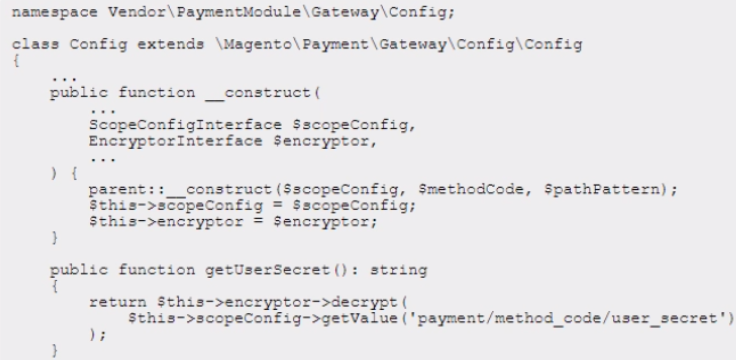
While reviewing a newly developed pull request that refactors multiple custom payment methods, the Architect notices multiple classes that depend on \Magento\Framework\Encryption\EncryptorInterf ace to decrypt credentials for sensitive data. The code that is commonly repeated is as follows:
In each module, the user_secret config is declared as follows:
The Architect needs to recommend an optimal solution to avoid redundant dependency and duplicate code among the methods. Which solution should the Architect recommend?
Correct answer:C
To avoid redundant dependency and duplicate code among the methods, you need to use the following solution:
Create a standard controller route and mapping the internal URLs (such as news/article/view/id/1) to rewrites that are generated on save and then stored in the URL rewrites table. This solution will leverage the built-in URL rewrite functionality of Magento to handle the news requests. You can create a standard controller route that handles the internal URLs and loads the news article by its ID. Then, you can generate URL rewrites for each news article based on its date and URL key and store them in the URL rewrites table. This way, you can avoid using a custom router or a plugin and reduce the code complexity.