Question 1
Which three of the following are valid page types in a site? (Choose three.)
Correct answer:
A, D, E

Exam dumps demo
Preview page 1 of 24 with real questions 1 to 5 from the full 121-question Appian set.
The Appian ACD101 exam, also known as the Appian Certified Associate Developer exam, is part of the Appian Certification Program. It is designed for candidates who want to validate their ability to work with the Appian platform and build practical solutions using core development concepts. This certification matters because it demonstrates readiness to handle essential Appian development tasks and supports career growth for aspiring Appian developers.
| # | Exam Topics | Sub-Topics | Approximate Weightage (%) |
|---|---|---|---|
| 1 | Appian Platform Overview | Platform purpose, key components, development environment, core capabilities | 15% |
| 2 | General Concepts of Appian Platform | Low-code basics, application structure, object types, deployment concepts | 14% |
| 3 | Developing Appian Expression Policies | Expression rules, logic design, reusable formulas, validation patterns | 14% |
| 4 | Data Persistence | Data types, records storage, entity mapping, persistence best practices | 14% |
| 5 | Appian development: Process models | Process flow design, nodes, variables, task routing, process monitoring | 15% |
| 6 | Deveping the Appian Interface Design | Interface components, layouts, form design, user interaction, responsive design | 14% |
| 7 | Developing Appian Records | Record types, views, relationships, reporting, record-based user experience | 14% |
| Total | 100% | ||
Which three of the following are valid page types in a site? (Choose three.)
Which Appian feature helps you access enterprise data quickly, define easily leveraged relationships, and establish custom fields based on available information?
What are three ways to start a process from an interface? (Choose three.)
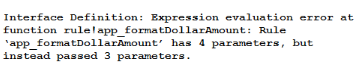
While calling this rule in your interface, you receive the following error message:
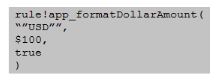
How could you have prevented this error from happening?
You are constructing an interface that is used as the form of a User Input Task in a process model.
The data entered on the form must be available in the process after the form is submitted.
Which domain prefix should be used for variables in the interface?
Full exam access, validated answers, and unlimited practice with no download limits.
This exam tests both conceptual understanding and practical Appian development ability. Candidates should be able to recognize platform concepts, apply expression logic, design interfaces, work with process models, manage data persistence, and build records-based solutions with confidence.
QA4Exam.com offers the Appian ACD101 Exam PDF with actual questions and answers, plus an Online Practice Test that helps you prepare in a realistic exam format. The practice test gives you a true simulation of the exam experience, so you can improve speed, accuracy, and time management before test day.
With updated questions and verified answers, you can focus on what matters most and study with confidence. The combination of PDF and online practice makes it easier to review key areas, reinforce weak points, and build the readiness needed to pass the Appian ACD101 exam on your first attempt.
If you want a focused and practical way to prepare, QA4Exam.com provides a straightforward path to exam success.
The Appian ACD101 exam is the Appian Certified Associate Developer exam and belongs to the Appian Certification Program.
It is for candidates who want to validate foundational Appian development skills and demonstrate readiness to work with the Appian platform.
The difficulty depends on your preparation, but it covers several core Appian topics, so studying the platform concepts and practicing real questions is important.
Braindumps alone are not the best approach. You should use them with practice and review so you understand the topics and answer patterns more effectively.
Hands-on experience is helpful because the exam covers practical development areas such as process models, interfaces, records, and data persistence.
They are a strong preparation tool because they provide actual questions and answers, verified content, and realistic practice, which can help you aim for a first-attempt pass.
The Exam PDF includes actual questions and answers, while the Online Practice Test gives you a simulated exam environment to practice time management and readiness.
They help you review current exam-style questions, check verified answers, improve speed, and identify weak areas before you take the real exam.