Prepare for the Atlassian Managing Jira Projects for Data Center and Server Certification exam with our extensive collection of questions and answers. These practice Q&A are updated according to the latest syllabus, providing you with the tools needed to review and test your knowledge.
QA4Exam focus on the latest syllabus and exam objectives, our practice Q&A are designed to help you identify key topics and solidify your understanding. By focusing on the core curriculum, These Questions & Answers helps you cover all the essential topics, ensuring you're well-prepared for every section of the exam. Each question comes with a detailed explanation, offering valuable insights and helping you to learn from your mistakes. Whether you're looking to assess your progress or dive deeper into complex topics, our updated Q&A will provide the support you need to confidently approach the Atlassian ACP-610 exam and achieve success.
Actual Atlassian ACP-610 Exam Questions
01Question 1
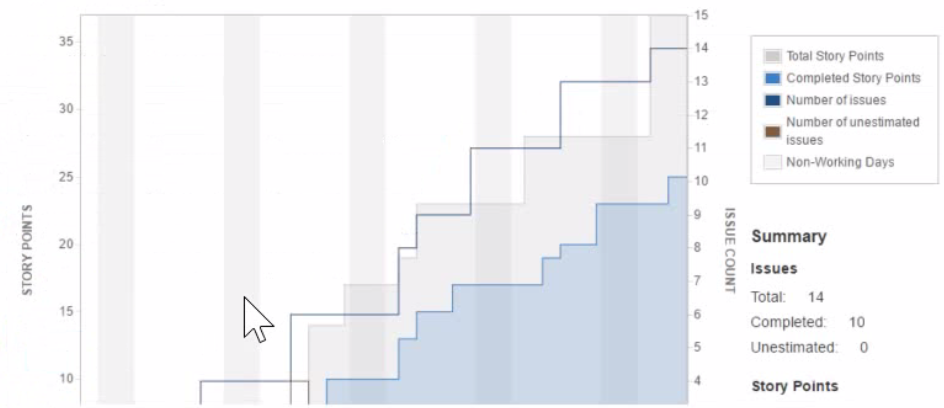
Development team A is consistently overestimating the work they can complete per sprint. They want to be able to compare work committed and work completed in sprints over time. Which single report provides this information?
A team currently uses a single project to track both features and tasks. They will be adopting aqile practices, as follows:
* Features will be developed during three week iterations.
* Tasks will be handled based on priority and rank and released incrementally as needed.
they want to use agile boards with minimal disruption to their current configuration. Which solution will meet their requirements?
Correct answer:E
The solution that will meet the team's requirements of using agile boards with minimal disruption to their current configuration is to use a Kanban board for tasks and a Scrum board for features in the current project. This way, they can use different agile methodologies for different issue types without creating a new project or changing their existing configuration. They can use a Kanban board for tasks to handle them based on priority and rank and release them incrementally as needed. They can use a Scrum board for features to develop them during three week iterations with sprints and backlogs. The other solutions are either not feasible or not optimal for their needs. Therefore, the correct answer is E.Reference: [Creating a board], [Using a Scrum board], [Using a Kanban board]
05Question 5
Bethany knows the URL of an issue that she wants to restore in a particular project.
What are the minimum two permissions that she needs to restore the issue? (Choose two.}