
Trusted Worldwide Questions & Answers
Most Recent Dell EMC D-PST-MN-A-24 Exam Dumps
Prepare for the Dell EMC Dell PowerStore Maintenance Achievement exam with our extensive collection of questions and answers. These practice Q&A are updated according to the latest syllabus, providing you with the tools needed to review and test your knowledge.
QA4Exam focus on the latest syllabus and exam objectives, our practice Q&A are designed to help you identify key topics and solidify your understanding. By focusing on the core curriculum, These Questions & Answers helps you cover all the essential topics, ensuring you're well-prepared for every section of the exam. Each question comes with a detailed explanation, offering valuable insights and helping you to learn from your mistakes. Whether you're looking to assess your progress or dive deeper into complex topics, our updated Q&A will provide the support you need to confidently approach the Dell EMC D-PST-MN-A-24 exam and achieve success.
The questions for D-PST-MN-A-24 were last updated on Sep 1, 2026.
- Viewing page 1 out of 12 pages.
- Viewing questions 1-5 out of 61 questions
Which component is an FRU?
In the context of Dell PowerStore Maintenance, the Battery Backup Unit (BBU) is considered an FRU because it is designed to be easily replaced in the field. The BBU is critical for maintaining power to the system in the event of a power failure, ensuring that data is not lost and the system can be shut down gracefully.
The other components listed, such as DIMMs, Embedded IO Modules, and Nodes, may not be as easily replaceable by the customer or may require more technical expertise or special tools. Therefore, they are not typically classified as FRUs within the Dell PowerStore ecosystem.
For detailed procedures on replacing the BBU or any other FRU components, it is recommended to refer to the official Dell PowerStore Maintenance documents and follow the guidelines provided for safe and effective replacement. This ensures that the system integrity is maintained and any warranty or support agreements remain valid.
Refer to the exhibit.
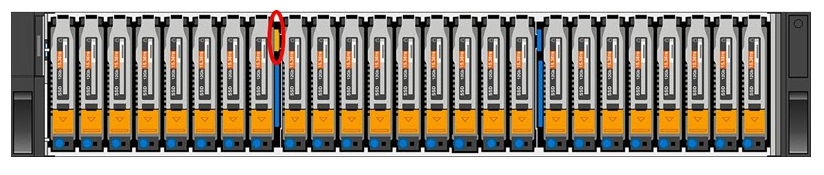
What is indicated when the circled LED on an expansion enclosure is illuminated amber?
The illuminated amber LED on an expansion enclosure typically indicates a fault. In the context of Dell PowerStore expansion enclosures, an amber light can signify various issues such as power supply problems, cooling system malfunctions, or other operational faults that may affect the enclosure's performance.
When troubleshooting, the following steps are generally taken:
Identify the specific LED that is illuminated amber using the hardware documentation.
Consult the Dell PowerStore Hardware Guide to determine the exact nature of the fault indicated by the amber LED.
Follow the recommended actions provided in the guide, which may include checking power connections, ensuring proper airflow, or other hardware checks.
If the issue persists, contact Dell Support for further assistance, providing them with the details of the fault LED and any other relevant information observed.
It's important to address any faults indicated by an amber LED promptly to maintain the integrity and reliability of the storage system. The Dell PowerStore documentation provides comprehensive information on LED indicators and troubleshooting steps to help resolve such issues effectively.
Refer to the exhibit.

What is indicated when the circled LED on the base enclosure is illuminated amber?
When the circled LED on the base enclosure of a Dell PowerStore system is illuminated amber, it typically indicates a fault within the base enclosure. This could be related to various issues such as power supply problems, cooling system malfunctions, or other operational faults that may affect the enclosure's performance.
In Dell PowerStore systems, LED indicators are used to communicate the status of the system's hardware components. An amber LED specifically suggests that there is a problem that needs to be addressed. The steps to investigate and resolve the issue usually include:
Checking the PowerStore Manager for alerts or messages that provide more details about the fault.
Inspecting the physical hardware to identify any visible signs of damage or failure.
Consulting the Dell PowerStore Hardware Guide for information on LED indicators and their meanings.
Following the recommended actions provided in the guide, which may include checking power connections, ensuring proper airflow, or other hardware checks.
If necessary, contacting Dell Support for further assistance, providing them with the details of the fault LED and any other relevant information observed.
It's important to address any faults indicated by an amber LED promptly to maintain the integrity and reliability of the storage system. The Dell PowerStore documentation provides comprehensive information on LED indicators and troubleshooting steps to help resolve such issues effectively.
When looking at the base enclosure front view, what does a solid amber drive LED indicate?
The LED states for the Dell PowerStore base enclosure are as follows:
Blue: Power is on, and no fault has occurred.
Solid Amber: Power is on, and a fault has occurred within the enclosure.
Blue after Amber Alternating: Power is on, but the system is not initialized.
Off: Power is off.
In the event of a solid amber LED, the recommended steps are:
Identify the faulted drive: Look for the drive with the solid amber LED.
Check the PowerStore Manager: Use the PowerStore Manager to identify the specific error or fault code associated with the drive.
Follow the troubleshooting steps: Refer to the Dell PowerStore Troubleshooting Guide for detailed steps on resolving the issue with the faulted drive.
Replace the drive if necessary: If the drive is determined to be faulty and cannot be recovered, follow the Dell PowerStore Hardware Information Guide for instructions on safely replacing the drive.
Which component is only replaceable by qualified personnel?
The base enclosure is a component that is typically only replaceable by qualified personnel. This is because the base enclosure of a Dell PowerStore system contains critical components and connections that require specialized knowledge and tools to handle properly. Replacing a base enclosure involves understanding the system's architecture, safely disconnecting and reconnecting various components, and ensuring that the system is not compromised during the process.
Unlock All Questions for Dell EMC D-PST-MN-A-24 Exam
Full Exam Access, Actual Exam Questions, Validated Answers, Anytime Anywhere, No Download Limits, No Practice Limits
Get All 61 Questions & Answers