
Trusted Worldwide Questions & Answers
Most Recent Dell EMC DEE-1111 Exam Dumps
Prepare for the Dell EMC Expert - PowerMax and VMAX All Flash Solutions Exam exam with our extensive collection of questions and answers. These practice Q&A are updated according to the latest syllabus, providing you with the tools needed to review and test your knowledge.
QA4Exam focus on the latest syllabus and exam objectives, our practice Q&A are designed to help you identify key topics and solidify your understanding. By focusing on the core curriculum, These Questions & Answers helps you cover all the essential topics, ensuring you're well-prepared for every section of the exam. Each question comes with a detailed explanation, offering valuable insights and helping you to learn from your mistakes. Whether you're looking to assess your progress or dive deeper into complex topics, our updated Q&A will provide the support you need to confidently approach the Dell EMC DEE-1111 exam and achieve success.
The questions for DEE-1111 were last updated on Sep 4, 2026.
- Viewing page 1 out of 11 pages.
- Viewing questions 1-5 out of 54 questions
Refer to exhibit.
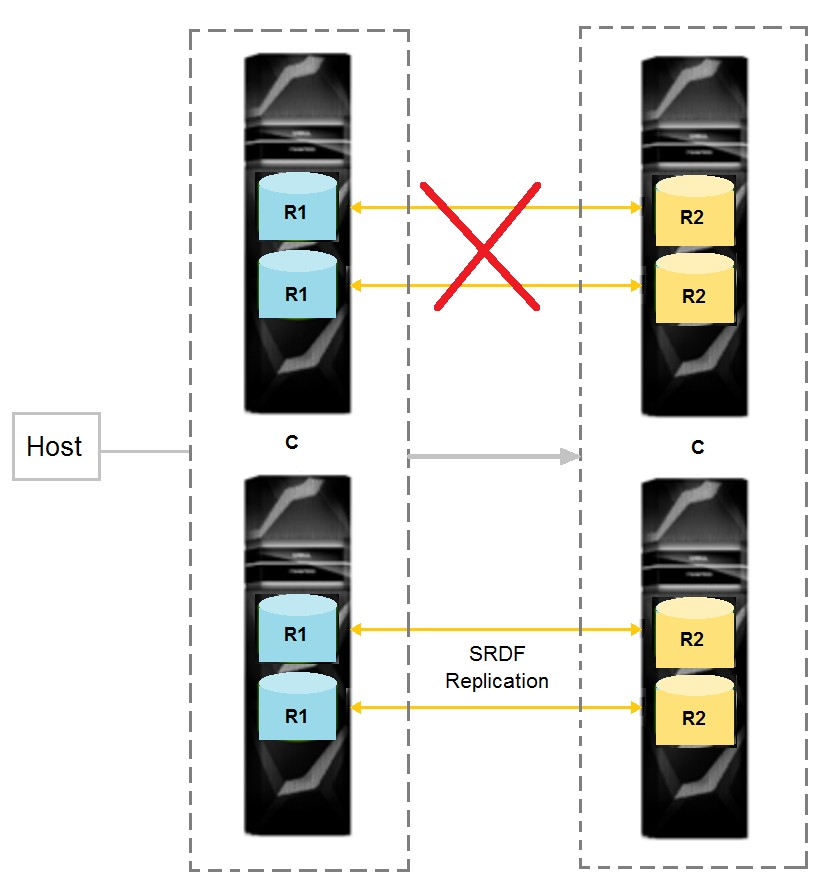
The RDF-ECA timer has expired.
What is the state of all the RDF links?
When the RDF-ECA timer expires, all RDF links will be in a 'Suspend' state. This is because the RDF-ECA timer is used to control how long SRDF waits for an acknowledgement from the remote array before it suspends the link. If an acknowledgement is not received within this time, SRDF assumes that there is a problem with the link or remote array and suspends the link to prevent data loss or corruption.
What is the maximum number of SCM RAID groups that can be added to a two-engine PowerMax 2000?
the maximum number of SCM RAID groups that can be added to a two-engine PowerMax 2000 would depend on various factors including the specific configuration of the system and the capacity requirements.
An application server has the following data characteristics:
80% of the I/O is generated with 8 KB random small blocks
20% of the I/O is generated with 64 KB sequential large blocks
50% of all I/O is a write
What workload profile do these data characteristics represent?
Which metrics are recommended to start analyzing the overall efficiency of the array due to cache?
The metrics that are recommended to start analyzing the overall efficiency of the array due to cache are array-level % Hit and % Cache WP. The array-level % Hit metric shows the percentage of read requests that are satisfied from the cache memory, without accessing the physical disks. A high % Hit value indicates that the cache is effective in reducing the read latency and improving the performance. The % Cache WP metric shows the percentage of cache memory that is occupied by write pending data, which is data that has been written to the cache but not yet destaged to the physical disks. A high % Cache WP value indicates that the cache is under pressure and may not have enough space to accommodate new write requests, which can lead to performance degradation. By monitoring these two metrics, a storage administrator can evaluate the overall efficiency of the array due to cache and identify any potential issues or bottlenecks.
System efficiency overview | Dell PowerMax: Data Reduction | Dell Technologies Info Hub
Metrics (PowerMax & VMAX) - VMware Docs
Replication cache | Dell EMC PowerMax and VMAX All Flash: TimeFinder SnapVX Local Replication
Refer to exhibit.
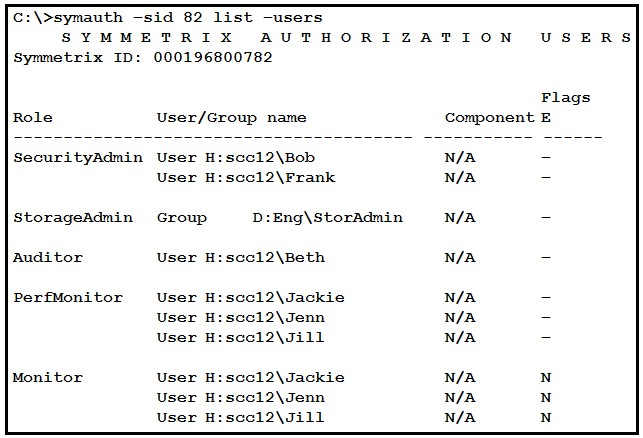
Refer to the exhibit.
Who has access to run the symaudit --list commands based on the symauth output shown in the exhibit?
Unlock All Questions for Dell EMC DEE-1111 Exam
Full Exam Access, Actual Exam Questions, Validated Answers, Anytime Anywhere, No Download Limits, No Practice Limits
Get All 54 Questions & Answers