Question 1
Which two options are used to create a NAS server in PowerStore Manager? (Choose two.)
Correct answer:
A, B

Exam dumps demo
Preview page 1 of 15 with real questions 1 to 5 from the full 73-question Dell set.
The Dell EMC D-PST-DY-23 - Dell PowerStore Deploy 2023 exam is part of the PowerStore Deploy certification track and is designed for professionals who work with Dell PowerStore solutions. It focuses on deployment, administration, provisioning, migration, and protection tasks that are essential in real-world storage environments. This exam matters because it validates practical knowledge of PowerStore concepts and implementation skills that support successful storage operations.
| # | Exam Topics | Sub-Topics | Approximate Weightage (%) |
|---|---|---|---|
| 1 | PowerStore Concepts and Features | Architecture overview, core platform capabilities, storage services, feature positioning | 10 |
| 2 | PowerStore Implementation | Deployment planning, initial setup, system configuration, implementation checks | 15 |
| 3 | PowerStore Administration | System management, monitoring, alerts, user and access administration | 15 |
| 4 | PowerStore Block Provisioning | Volumes, hosts, storage presentation, block resource configuration | 12 |
| 5 | PowerStore File Provisioning | File systems, NAS resources, shares, file service setup | 12 |
| 6 | PowerStore VMware Provisioning | VMware integration, datastore provisioning, vSphere connectivity, storage mapping | 12 |
| 7 | PowerStore Migration | Migration planning, data movement, source and target alignment, cutover tasks | 12 |
| 8 | PowerStore Remote Protection | Replication concepts, remote protection setup, recovery planning, protection policies | 12 |
This exam tests both conceptual understanding and practical ability across the full PowerStore deployment lifecycle. Candidates should be prepared to recognize correct configuration choices, understand operational workflows, and apply knowledge to administration, provisioning, migration, and protection scenarios. Strong preparation requires familiarity with the platform and the ability to interpret exam-style questions accurately.
Which two options are used to create a NAS server in PowerStore Manager? (Choose two.)
A storage administrator provisions a VMware file system from a NAS server configured with NFSv4.
What is the access requirement for the ESXi host?
NFSv4 and ESXi Host Access
When provisioning a VMware file system (like a datastore) from a NAS server using NFSv4, the ESXi host needs specific permissions to function correctly:
Read/Write Access: This is fundamental. The ESXi host must be able to both read data from and write data to the datastore. This is essential for storing virtual machine files, writing logs, and managing the overall file system.
Allow Root Access: ESXi hosts require root-level access to the NFS datastore. This is critical for:
Creating and Managing VMDKs: Root access is necessary to create, delete, and modify virtual machine disk files (VMDKs) on the datastore.
Managing VM Files: The host needs root permissions to manage various virtual machine configuration files and logs stored on the datastore.
Maintaining File System Integrity: Root access allows the ESXi host to perform essential file system operations to ensure consistency and prevent data corruption.
Why Other Options Are Incorrect
A . Read/Write: While read/write access is necessary, it's not sufficient on its own. Root access is also required.
B . Kerberos with Integrity: Kerberos is a security protocol that can be used with NFSv4 for authentication, but it's not a basic access requirement for ESXi hosts. While Kerberos enhances security, it's not strictly mandatory for basic functionality.
C . Kerberos with Encryption: Similar to Kerberos with integrity, encryption adds another layer of security but isn't a fundamental requirement for ESXi host access to an NFSv4 datastore.
Important Considerations
NFS Owner: When configuring NFSv4 on PowerStore, you typically set the 'NFS Owner' to 'root' for ESXi hosts. This ensures that the host has the necessary permissions.
no_root_squash: On some NAS systems, you might need to configure the no_root_squash option in the NFS export settings. This option prevents the NAS server from mapping the root user on the ESXi host to a less privileged user, ensuring that the host retains root access to the NFS share.
Dell PowerStore Reference
PowerStore: Create a File System for NFS Exports: This document in the PowerStore documentation provides guidance on creating and configuring file systems for NFS exports, including details about setting NFS permissions and the NFS owner.
Topic 2,
SIMULATION / Lab Based Questions
SIMULATION
create an SMB NAS server in the PowerStore simulator using the provided information.
Here's the information that is given:
NAS and SMB computer name: payrollserver
Network Interface: BaseEnclosure-bond1
IP address: 192.168.2.20
Subnet: /24
Gateway: 192.168.2.254
VLAN: 1504
AD/DNS: 192.168.2.50
Windows domain name: company.com
Domain administrator credentials: (presumably Administrator/password)
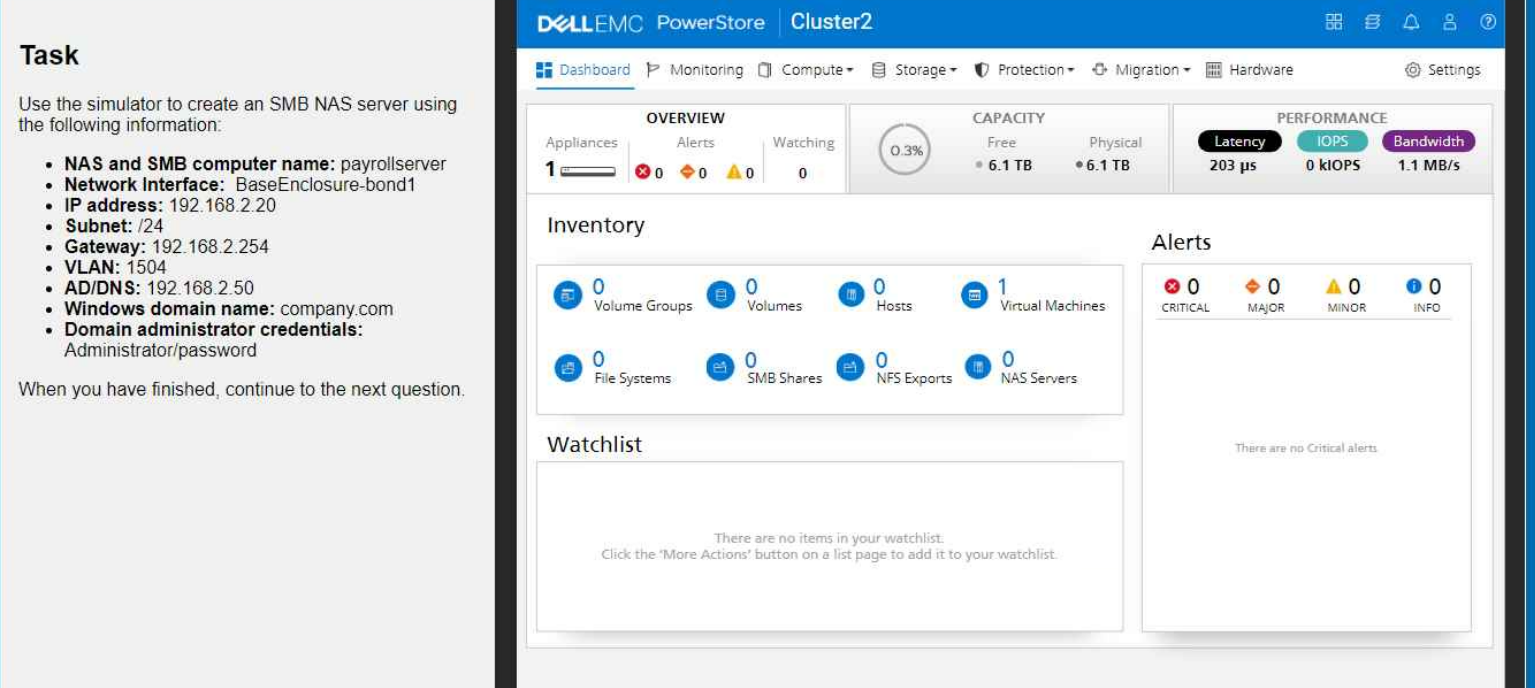
1. Navigate to NAS Servers
Go to Compute > NAS Servers.
Click Add NAS Server.
2. Configure NAS Server Settings
NAS Server Name: Enter payrollserver.
Network Interface: Select BaseEnclosure-bond1.
IP Address: Enter 192.168.2.20.
Subnet: Enter /24.
Gateway: Enter 192.168.2.254.
VLAN: Enter 1504.
AD/DNS: Enter 192.168.2.50.
Windows domain name: Enter company.com.
Domain administrator credentials: Enter Administrator for the username and password for the password.
3. Add the NAS Server
Click Add.
Verification
After the NAS server is created, you can verify its configuration on the NAS Servers page. Check that all the settings are correct.
Key Considerations
Network Connectivity: Ensure that the network interface (BaseEnclosure-bond1) is properly configured and connected to the network with the specified VLAN.
Active Directory Integration: The provided domain administrator credentials will be used to join the NAS server to the Active Directory domain. Make sure these credentials are valid.
DNS Resolution: The AD/DNS server IP address (192.168.2.50) should be reachable from the PowerStore appliance for proper name resolution.
By following these steps, you'll successfully create an SMB NAS server with the specified configuration in the PowerStore simulator.
When does a Protection Pokey have to be removed from PowerStore storage resource? (Choose two.)
Which three configurations are supported on the file system in PowerStore? (Choose three.)
Full exam access, validated answers, and unlimited practice with no download limits.
QA4Exam.com offers the Exam PDF with actual questions and answers plus an Online Practice Test for the Dell EMC D-PST-DY-23 exam. The practice test gives you a real exam simulation so you can build confidence with the question style and pacing before test day. Our content is updated to help you study the most relevant material, and verified answers help you review with clarity. You also get time management practice, which is important for finishing confidently and avoiding surprises on exam day. With the right mix of PDF review and online practice, you can prepare more efficiently and aim for a first-attempt pass.
It is intended for candidates preparing for the PowerStore Deploy certification track and for professionals involved in Dell PowerStore deployment and administration tasks.
It can be challenging because it covers multiple areas such as implementation, provisioning, migration, and remote protection, so a solid study plan is important.
Braindumps alone are not the best approach. You should use the Exam PDF and Online Practice Test as study aids and also understand the concepts behind the answers.
Hands-on experience is very helpful because the exam includes practical topics like administration, provisioning, migration, and protection workflows.
They are a strong preparation tool because they provide actual questions and answers, verified answers, and realistic practice, but candidates should also review the topic areas carefully.
QA4Exam.com provides an Exam PDF with questions and answers and an Online Practice Test designed to simulate the exam experience and support efficient revision.
The online practice format lets you work under exam-like timing so you can improve speed, accuracy, and confidence before the real test.