
Limited-Time Offer: Enjoy 50% Savings! - Ends In 0d 00h 00m 00s Coupon code: 50OFF
Welcome to QA4Exam
Logo

- Trusted Worldwide Questions & Answers

Exam dumps demo

D-PVM-OE-01 Exam Dumps and Practice Questions

Preview page 1 of 10 with real questions 1 to 5 from the full 49-question Dell set.

Dell EMC D-PVM-OE-01 Dumps - Pass Dell PowerMax Operate v.2 Exam in First Attempt 2026

The Dell EMC D-PVM-OE-01 exam, Dell PowerMax Operate v.2, is part of the PowerMax Operate certification path. It is designed for professionals who work with Dell PowerMax storage systems and need practical knowledge of administration, provisioning, monitoring, replication, and data mobility. This exam matters because it validates the skills required to operate PowerMax environments with confidence in real-world settings. Earning this certification can help demonstrate your ability to manage key PowerMax technologies effectively.

# Exam Topics Sub-Topics Approximate Weightage (%)
1 PowerMax Family Business Continuity Administration Service continuity concepts; failover and failback planning; business continuity operations; recovery considerations 14%
2 PowerMax Family Storage Provisioning Storage allocation basics; device creation and mapping; host access setup; provisioning workflow 15%
3 PowerMax Family Monitoring and Workload Planning Performance monitoring; workload analysis; capacity awareness; operational planning 13%
4 PowerMax Family Management in a Virtual Environment Virtualized management tasks; integration concepts; environment administration; operational visibility 11%
5 PowerMax Family Local and Remote Replication Concepts Local replication basics; remote replication use cases; protection planning; replication terminology 14%
6 Unisphere for PowerMax 10 Implementation and Administration Unisphere deployment concepts; interface navigation; administration tasks; configuration and monitoring 13%
7 Solutions Enabler 10 Implementation Solutions Enabler setup; command-line administration; environment configuration; management operations 10%
8 PowerMaxOS 10 Data Mobility Data movement concepts; mobility planning; migration awareness; operational impact of mobility tasks 10%

This exam tests how well candidates can apply PowerMax operational knowledge across administration, monitoring, provisioning, and replication scenarios. It is not just about memorizing terms, but also about understanding how the platform behaves in practical environments and how to choose the right operational approach.

Actual Dell D-PVM-OE-01 Exam Questions

Question 1

A Storage Administrator runs the command:

syradm list -environment -offline

What migration environments are listed?

Correct answer: C

Step by Step Comprehensive Detailed

The syradm list -environment -offline command in Solutions Enabler is used to display information about migration environments that are currently offline.

Here's what it shows:

Controlled Environments: It lists the migration environments that are directly controlled by the host where the command is executed. These are the environments where the host acts as the primary control point for the migration.

Reachable Environments: It also lists environments that are reachable from the host executing the command. This includes environments controlled by other hosts that are connected and accessible within the SAN fabric.

This broader scope allows administrators to get a comprehensive view of offline migration environments across their managed systems.

Why other options are incorrect:

A . The environments where the application has been taken offline to perform the cutover: While offline environments might be associated with cutovers, the command shows all offline environments regardless of their specific stage in the migration process.

B . Only the environments controlled by the host from where the list command is run: It also includes reachable environments, not just those directly controlled by the host.

Reference and documents of Dell's public documentation for PowerMax Operate v.2:

Dell Solutions Enabler 10.0.0 CLI User Guide: This guide provides detailed information about the syradm command and its various options, including the list -environment -offline command for displaying offline migration environments. You can find this document on the Dell Support website by searching for 'Solutions Enabler CLI User Guide.'

Question 2

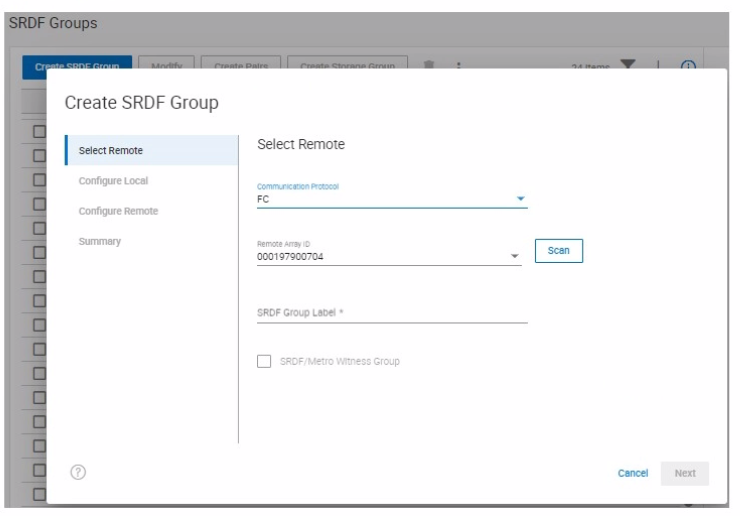
Refer to the exhibit.

SRDF/Metro has been configured between two arrays using a physical witness.

When creating a new SRDF group for the configuration, why is the option to create an SRDF/Metro Witness Group greyed out?

Correct answer: A

Step by Step Comprehensive Detailed

SRDF/Metro is a high-availability solution that provides synchronous replication between two storage arrays located within a metropolitan distance. It utilizes a witness to prevent data loss in the event of a split-brain scenario (where communication between the arrays is lost).

In SRDF/Metro, there can be only one Witness Group defined between two specific arrays. This Witness Group manages the witness device that acts as a tie-breaker in case of a communication failure between the arrays.

Since the exhibit shows that SRDF/Metro has already been configured between the two arrays using a physical witness, the option to create another SRDF/Metro Witness Group is grayed out because a Witness Group already exists for that pair of arrays.

Why other options are incorrect:

B . SRDF/Metro Witness Groups can only be created with CLI: While CLI can be used, Witness Groups can also be created through Unisphere for PowerMax.

C . The SRDF Group Label needs to be left blank when creating an SRDF/Metro Witness Group: This is not a requirement. Witness Groups can have labels.

Reference and documents of Dell's public documentation for PowerMax Operate v.2:

Dell Solutions Enabler 10.0.0 SRDF Family CLI User Guide: This guide provides detailed information about SRDF/Metro configuration, including the role of the witness and the Witness Group. You can find this document on the Dell Support website by searching for 'Solutions Enabler SRDF Family CLI User Guide.'

Dell PowerMax Family: Essentials and Best Practices Guide: This guide offers a comprehensive overview of SRDF/Metro and its functionalities, including witness configuration and best practices.


Question 3

What does the symsan command do when scanning the SAN environment for devices to use in an O-MDM session?

Correct answer: C

Step by Step Comprehensive Detailed

The symsan command in Solutions Enabler is used for various SAN (Storage Area Network) management tasks. One of its functions is to scan the SAN environment to discover and verify the configuration of devices and paths.

When used in the context of an Open Replicator Migrator for Dell EMC (O-MDM) session, the symsan command specifically:

Verifies SAN Configuration: It checks the connectivity and configuration of the SAN fabric to ensure that the source and target devices are accessible and properly configured for the migration.

Non-Disruptive: It performs this verification without disrupting any applications or host I/O operations on the remote host. This is crucial for maintaining business continuity during the migration planning phase.

Why other options are incorrect:

A . Temporarily stops the remote application to verify the SAN configuration: symsan does not stop applications; it performs a non-disruptive scan.

B . Verifies the SAN configuration and creates an ORS session on the remote host: symsan only verifies the SAN; it doesn't create ORS (Open Replicator Solutions) sessions.

D . Temporarily stops the remote application and creates an ORS session: Again, symsan doesn't stop applications or create ORS sessions.

Reference and documents of Dell's public documentation for PowerMax Operate v.2:

Dell Solutions Enabler 10.0.0 CLI User Guide: This guide provides detailed information about the symsan command and its various options, including its use for SAN discovery and verification. You can find this document on the Dell Support website by searching for 'Solutions Enabler CLI User Guide.'

Dell PowerMax Family: Essentials and Best Practices Guide: This guide may offer general information about SAN management and migration tools, providing context for understanding the role of the symsan command.


Question 4

A storage administrator is using SE 10 to query a PowerMax 2000 using symcfg list -dir and wants to seethe number of Cores that are assigned to the front-end emulations

What does the storage administrator need to do?

Correct answer: A

Step by Step Comprehensive Detailed

Solutions Enabler (SE) 10 introduces some changes to the output format of certain commands for better clarity and consistency. When querying a PowerMax 2000 (which is based on older VMAX architecture) using symcfg list -dir, you might encounter differences in the output compared to previous SE versions.

To ensure backward compatibility and see the output in the familiar format, you need to use the -mode v9x argument. This tells SE 10 to display the output in the style of SE 9.x, which is compatible with the PowerMax 2000.

Why other options are incorrect:

B . Look for CPU instead of Cores as these have been rebranded...: While there might be terminology changes, this is not the primary reason for the output difference.

C . Specify the full 12-digit serial number with -sid so SE 10 understands...: The serial number is not directly related to the output format.

D . Use syraconfigure -version -dir as in SE 10 support for outputs...: The syraconfigure command is not the correct command for this purpose.

Reference and documents of Dell's public documentation for PowerMax Operate v.2:

Dell Solutions Enabler 10.0.0 CLI User Guide: This guide provides detailed information about the symcfg command and its options, including the -mode argument for backward compatibility. You can find this document on the Dell Support website by searching for 'Solutions Enabler CLI User Guide.'


Question 5

What is the largest TDEV PowerMaxOS 5978 can create?

Correct answer: B

Step by Step Comprehensive Detailed

In PowerMaxOS 5978, the largest TDEV (Thin Device) that can be created is 64 TB. This represents the maximum size for a single, thinly provisioned storage volume on a PowerMax array running that version of the operating system.

Reference and documents of Dell's public documentation for PowerMax Operate v.2:

Dell PowerMax Family: Essentials and Best Practices Guide: This guide provides an overview of PowerMax features and capabilities, including information about storage device sizes and limits.

Dell Solutions Enabler 10.0.0 CLI User Guide: This guide might contain details about the maximum size of TDEVs that can be created using SYMCLI commands.

Topic 2,

SIMULATION


Unlock all Dell D-PVM-OE-01 questions

Full exam access, validated answers, and unlimited practice with no download limits.

How QA4Exam.com Helps You Pass

QA4Exam.com offers an Exam PDF with actual questions and answers plus an Online Practice Test to help you prepare efficiently for the Dell EMC D-PVM-OE-01 exam. The practice test gives you a real exam simulation so you can get used to the format and pacing before test day. The questions are updated and the answers are verified, which helps you focus on the most relevant exam content. You also get a chance to improve time management and identify weak areas before taking the real exam. With the right preparation tools, you can approach the Dell PowerMax Operate v.2 exam with more confidence and a stronger chance of passing on your first attempt.

Frequently Asked Questions

Who should take the Dell EMC D-PVM-OE-01 exam?

This exam is intended for candidates who want to validate their skills in Dell PowerMax Operate v.2 and related PowerMax administration topics. It is a strong fit for professionals working with storage operations, provisioning, monitoring, and replication concepts.

Is the Dell PowerMax Operate v.2 exam difficult?

The difficulty depends on your hands-on experience and how well you understand the listed exam topics. Candidates who know PowerMax operations, Unisphere, Solutions Enabler, and replication concepts usually find it easier to prepare.

Can I pass with only braindumps?

Braindumps alone are not the best strategy. You should use them as a preparation aid along with topic review and practical understanding so you can answer questions with more confidence.

Do I need hands-on experience to pass this exam?

Hands-on experience is very helpful because the exam covers practical PowerMax operational tasks. Even if you are using dumps and a practice test, real familiarity with the technologies can improve your results.

Are QA4Exam.com dumps enough to pass the exam?

QA4Exam.com dumps and the online practice test are designed to strengthen your preparation, but the best results come from combining them with topic review. This approach helps you understand the exam format, verify answers, and improve recall.

How does the QA4Exam.com practice test help with first-attempt success?

The online practice test helps you simulate the exam environment, manage time better, and identify areas that need more study. That kind of practice can improve your readiness and support a stronger first-attempt outcome.

What format do the QA4Exam.com exam dumps and practice test use?

The Exam PDF provides questions and answers in a convenient study format, while the Online Practice Test is built for interactive exam simulation. Together, they help you review content and practice under test-like conditions.