Prepare for the F5 Networks BIG-IP Administration Data Plane Configuration exam with our extensive collection of questions and answers. These practice Q&A are updated according to the latest syllabus, providing you with the tools needed to review and test your knowledge.
QA4Exam focus on the latest syllabus and exam objectives, our practice Q&A are designed to help you identify key topics and solidify your understanding. By focusing on the core curriculum, These Questions & Answers helps you cover all the essential topics, ensuring you're well-prepared for every section of the exam. Each question comes with a detailed explanation, offering valuable insights and helping you to learn from your mistakes. Whether you're looking to assess your progress or dive deeper into complex topics, our updated Q&A will provide the support you need to confidently approach the F5 Networks F5CAB3 exam and achieve success.
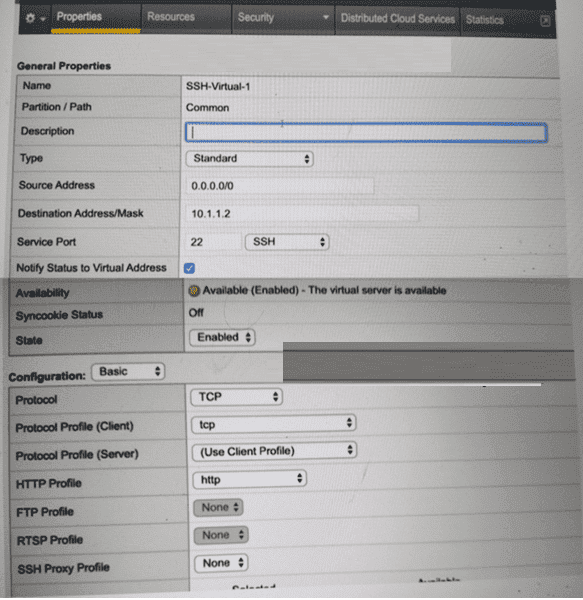
Refer to the exhibit.

A BIG-IP Administrator creates a new Virtual Server to load balance SSH traffic. Users are unable to log on to the servers.
What should the BIG-IP Administrator do to resolve the issue? (Choose one answer)
SSH is a Layer 4 TCP-based protocol that operates on TCP port 22 and does not use HTTP in any capacity. In the exhibit, the Virtual Server is configured with an HTTP Profile applied, which is inappropriate for SSH traffic and causes connection failures.
According to the BIG-IP Administration: Data Plane Configuration documentation:
An HTTP profile must only be applied to Virtual Servers handling HTTP or HTTPS traffic.
When an HTTP profile is attached, BIG-IP expects HTTP headers and attempts to parse application-layer data.
Non-HTTP protocols such as SSH, FTP (control), SMTP, and other raw TCP services will fail if an HTTP profile is enabled.
Why the other options are incorrect:
A . Set Protocol to UDPSSH uses TCP, not UDP. Changing the protocol would break SSH entirely.
B . Set Source Address to 10.1.1.2The source address setting controls client access restrictions and is unrelated to protocol parsing issues.
C . Set Destination Address/Mask to 0.0.0.0/0The destination address is already valid for a specific SSH service and does not impact protocol handling.
Correct Resolution:
The BIG-IP Administrator should remove the HTTP Profile (set it to None) so the Virtual Server functions as a pure Layer 4 TCP service, allowing SSH connections to pass through successfully.
Users report that traffic is negatively affected every time a BIG-IP device fails over. The traffic becomes stabilized after a few minutes. What should the BIG-IP Administrator do to reduce the impact of future failovers?
When a failover occurs in a standard BIG-IP High Availability (HA) pair, the newly active device takes over the floating IP addresses (Virtual Servers, Self IPs). By default, the new active device sends Gratuitous ARP (GARP) messages to the local network switch to inform it that these IP addresses are now associated with its own physical MAC addresses. However, network switches and intermediate routers often have ARP aging timers or security features that may delay the updating of their ARP tables, leading to 'black-holed' traffic or dropped packets for several seconds or minutes until the network infrastructure correctly relearns the new path.
To eliminate this delay and ensure a seamless transition, a BIG-IP Administrator should Configure MAC Masquerade. MAC Masquerade allows the administrator to assign a unique, 'virtual' MAC address to a specific traffic group. Instead of using the hardware-burned MAC address of the individual appliance, the active device uses this shared virtual MAC address for all communication involving floating IPs. When a failover occurs, the standby device assumes control of the traffic group and begins using the exact same virtual MAC address. Because the MAC address associated with the VIPs never changes from the switch's perspective, there is no need for the switch to update its MAC address table or for the surrounding infrastructure to update its ARP caches. This effectively eliminates the 'stabilization period' reported by users, as the data plane transition happens almost instantaneously at Layer 2, maintaining continuous traffic flow without being hindered by external network re-convergence times.
A virtual server is configured to offload SSL from a pool of backend servers. When users connect to the virtual server, they successfully establish an SSL connection but no content is displayed. A packet trace performed on the server shows that the server receives and responds to the request. What should a BIG-IP Administrator do to resolve the problem?
This scenario describes a classic routing issue often encountered during SSL offload deployments. The fact that an SSL connection is established indicates the Client SSL profile is working correctly. The packet trace showing the server 'receives and responds' to the request is the most critical diagnostic clue.
When a BIG-IP receives traffic, it typically passes the client's original source IP address to the backend server. If the backend server's default gateway is not the BIG-IP (a common 'one-arm' network topology), the server will attempt to send its response directly back to the client's IP via its own default router. The client's browser will reject this response because it expects traffic to come from the Virtual Server's IP, not the backend server's IP.
To resolve this, the administrator must enable SNAT (Source Address Translation), typically using SNAT Automap. When SNAT is enabled, the BIG-IP replaces the client's original source IP with one of its own Self IPs before forwarding the request to the server. Because the source of the packet is now the BIG-IP, the backend server is forced to send its response back to the BIG-IP. The BIG-IP then receives the response, translates it back, and delivers the content to the user. Option A is unnecessary if the servers are expecting plain-text traffic after the BIG-IP performs offload. Option D would only worsen the existing routing discrepancy.
Refer to the exhibit.

A BIG-IP Administrator needs to configure health monitors for a newly configured server pool named Pool_B.
Which health monitor settings will ensure that all pool members will be accurately marked as available or unavailable? (Choose one answer)
From the exhibit, the pool contains different applications on different service ports (for example, HTTP/80, FTP/21, HTTPS/443, SSH/22). To mark pool members correctly, BIG-IP must be able to verify the actual service running on each member's port.
In BIG-IP Administration: Data Plane Configuration, monitor behavior is described as follows:
When multiple monitors are assigned to a pool, the Availability Requirement controls how monitor results are evaluated:
At least one = the pool member is marked up if any one of the assigned monitors succeeds.
All = the pool member is marked up only if every assigned monitor succeeds.
For pools containing members with different services/ports, using All can incorrectly mark members down because monitors intended for other services will fail on the wrong port.
Why C is correct:
Assigning HTTPS, HTTP, FTP, and SSH covers the actual services shown in the pool.
Setting the Availability Requirement to at least one ensures that each pool member is considered available when its appropriate service monitor succeeds, without being forced to pass unrelated service monitors.
Why the other options are incorrect:
A / D (Availability Requirement = all): would cause members to be marked down when unrelated monitors fail (e.g., SSH monitor against an HTTP member).
B (includes ICMP): ICMP can indicate the host is reachable even if the application service is down, which does not ''accurately'' reflect service availability.
Therefore, the best choice is HTTPS, HTTP, FTP, and SSH with Availability Requirement of at least one health monitor.
A Standard Virtual Server for a web application is configured with Automap for Source Address Translation. The original client IP must be known by backend servers.
What should the BIG-IP Administrator configure?
The X-Forwarded-For header preserves the original client IP when SNAT is enabled.
Full Exam Access, Actual Exam Questions, Validated Answers, Anytime Anywhere, No Download Limits, No Practice Limits
Get All 76 Questions & Answers