
Trusted Worldwide Questions & Answers
Most Recent Fortinet FCP_FWB_AD-7.4 Exam Dumps
Prepare for the Fortinet FCP - FortiWeb 7.4 Administrator exam with our extensive collection of questions and answers. These practice Q&A are updated according to the latest syllabus, providing you with the tools needed to review and test your knowledge.
QA4Exam focus on the latest syllabus and exam objectives, our practice Q&A are designed to help you identify key topics and solidify your understanding. By focusing on the core curriculum, These Questions & Answers helps you cover all the essential topics, ensuring you're well-prepared for every section of the exam. Each question comes with a detailed explanation, offering valuable insights and helping you to learn from your mistakes. Whether you're looking to assess your progress or dive deeper into complex topics, our updated Q&A will provide the support you need to confidently approach the Fortinet FCP_FWB_AD-7.4 exam and achieve success.
The questions for FCP_FWB_AD-7.4 were last updated on Apr 22, 2026.
- Viewing page 1 out of 7 pages.
- Viewing questions 1-5 out of 36 questions
When is it possible to use a self-signed certificate, rather than one purchased from a commercial certificate authority?
A self-signed certificate is useful when all the devices in your network can be configured to trust it. In this case, if your enterprise's computers trust the internal Active Directory or Certificate Authority (CA) server that signed the certificate, the self-signed certificate can be used internally for HTTPS connections without raising trust issues.
Which three stages are part of creating a machine learning (ML) bot detection algorithm? (Choose three.)
Model building: In this stage, you design and develop the ML model, which involves selecting appropriate algorithms and features to detect bot activity.
Model verification: This is where you test and evaluate the model's performance to ensure it can accurately detect bots without false positives or negatives.
Sample collecting: Gathering relevant data samples (e.g., bot and non-bot traffic) to train the machine learning model is crucial to ensure it can learn from various scenarios.
Which two objects are required to configure a server policy in reverse proxy mode without content routing? (Choose two.)
Protected hostname: In reverse proxy mode, the protected hostname refers to the domain or hostname that FortiWeb will protect. It specifies which hostname FortiWeb is acting as a reverse proxy for, and is required for the server policy configuration.
Virtual server: A virtual server is a logical representation of a web server that FortiWeb handles. It's required to configure how traffic is routed to the protected resources in reverse proxy mode.
Refer to the exhibits.
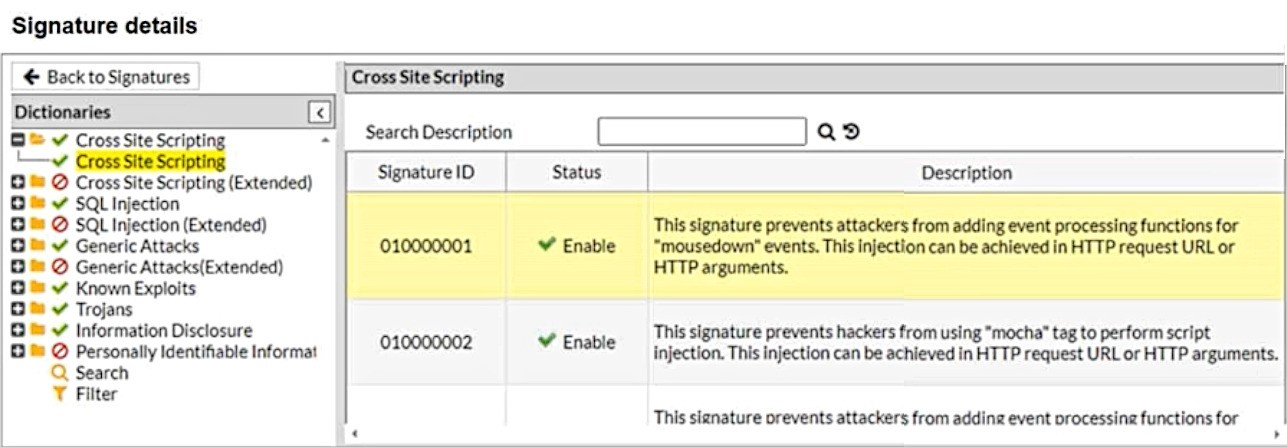
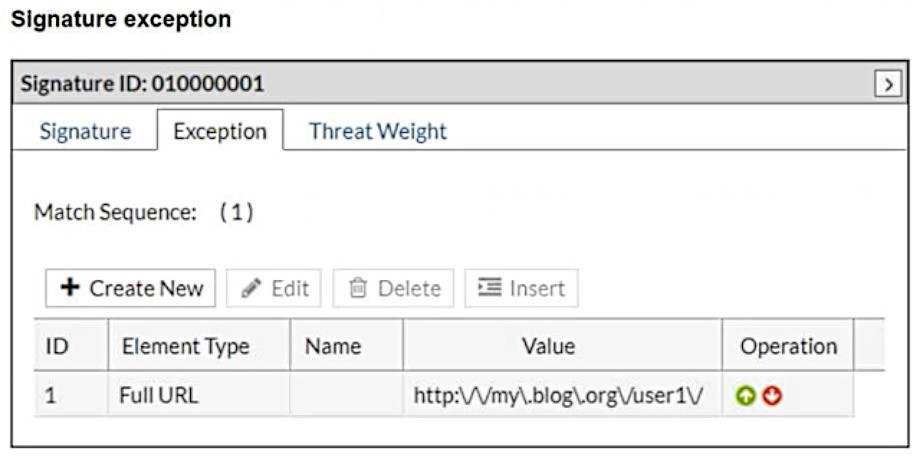
What will happen when a client attempts a mousedown cross-site scripting (XSS) attack against the site http://my.blog.org/userl1/blog.php and FortiWeb is enforcing the highlighted signature?
In the provided configuration, the signature exception has been set for the URL http://my.blog.org/user1V. This means that any request to this specific URL will bypass the signature ID 01000001, which is designed to block cross-site scripting (XSS) attacks using the mousedown event. As the request comes from the URL http://my.blog.org/userl1/blog.php, which does not match the exception rule for http://my.blog.org/user1V, the attack will be allowed through.
Therefore, the connection will be allowed because the exception rule bypasses protection for the specified URL.
Which three security features must you configure on FortiWeb to protect API connections? (Choose three.)
Machine learning (ML)-based API protection: ML-based API protection helps detect and mitigate abnormal behavior in API traffic, such as bot attacks or abuse, by learning and adapting to normal traffic patterns.
API schema validation: API schema validation ensures that the API requests conform to the defined schema (e.g., checking the structure, fields, and types in the API calls). This helps prevent attacks like XML or JSON injection by ensuring only valid requests are processed.
API user key enforcement: Enforcing API user key authentication requires clients to provide valid API keys, ensuring only authorized users can access the API. This is crucial for controlling access to the API.
Unlock All Questions for Fortinet FCP_FWB_AD-7.4 Exam
Full Exam Access, Actual Exam Questions, Validated Answers, Anytime Anywhere, No Download Limits, No Practice Limits
Get All 36 Questions & Answers