Limited-Time Offer: Enjoy 50% Savings! - Ends In 0d 00h 00m 00s Coupon code: 50OFF
Welcome to QA4Exam
Logo

- Trusted Worldwide Questions & Answers

Most Recent Fortinet NSE6_FSM_AN-7.4 Exam Dumps


Prepare for the Fortinet NSE 6 - FortiSIEM 7.4 Analyst exam with our extensive collection of questions and answers. These practice Q&A are updated according to the latest syllabus, providing you with the tools needed to review and test your knowledge.

QA4Exam focus on the latest syllabus and exam objectives, our practice Q&A are designed to help you identify key topics and solidify your understanding. By focusing on the core curriculum, These Questions & Answers helps you cover all the essential topics, ensuring you're well-prepared for every section of the exam. Each question comes with a detailed explanation, offering valuable insights and helping you to learn from your mistakes. Whether you're looking to assess your progress or dive deeper into complex topics, our updated Q&A will provide the support you need to confidently approach the Fortinet NSE6_FSM_AN-7.4 exam and achieve success.

The questions for NSE6_FSM_AN-7.4 were last updated on Jul 13, 2026.
  • Viewing page 1 out of 10 pages.
  • Viewing questions 1-5 out of 48 questions
Get All 48 Questions & Answers
Question No. 1

What can you use to send data to FortiSIEM for user and entity behavior analytics (UEBA)?

Show Answer Hide Answer
Correct Answer: A

The correct answer is A. FortiSIEM agent. The FortiSIEM Study Guide identifies FortiSIEM agents as the component responsible for ''file, log monitoring, and UEBA.'' It also explains that FortiSIEM agents can be installed on endpoints or servers to provide data collection functions that native syslog may not provide. For Windows systems specifically, the guide states that Windows servers do not natively send syslog messages and that a FortiSIEM Windows agent can be installed to perform that function. The FortiSIEM 7.4 User Guide also confirms that FortiInsight UEBA functionality runs as an integrated module within the FortiSIEM Windows Agent in newer releases. SSH and SNMP are access or monitoring protocols; they can support discovery or performance monitoring, but they are not the UEBA data-sending component. A FortiSIEM worker performs analysis and search functions inside the FortiSIEM architecture; it is not installed on endpoints to collect UEBA telemetry. Therefore, the FortiSIEM agent is the correct mechanism for sending UEBA-relevant endpoint data to FortiSIEM.


Question No. 2

Refer to the exhibit.

The analyst is troubleshooting the analytics query shown in the exhibit.

Why is this search not producing any results?

Show Answer Hide Answer
Correct Answer: B

The search fails because nested analytics queries require the outer query attribute type to match the inner query display-column data type. The FortiSIEM Study Guide explicitly explains this rule in the Nested Query section: ''Another important aspect to understand is that the data value types must match.'' It further explains that each inner query display column has a data value type, such as IP, string, or integer, and the outer query attribute must match that type. The FortiSIEM 7.4 User Guide states the same operational requirement: for a nested query to work correctly, ''the data type of the filter attribute in the outer query must match up with the data type of one certain display column in the inner query.'' Therefore, if the inner query returns a string attribute but the outer query compares it against an IP-type attribute, FortiSIEM cannot produce a valid match. The issue is not the time range, not the use of User and Event Type together, and not the Boolean operator. It is an attribute type mismatch between the query and subquery.


Question No. 3

Refer to the exhibit.

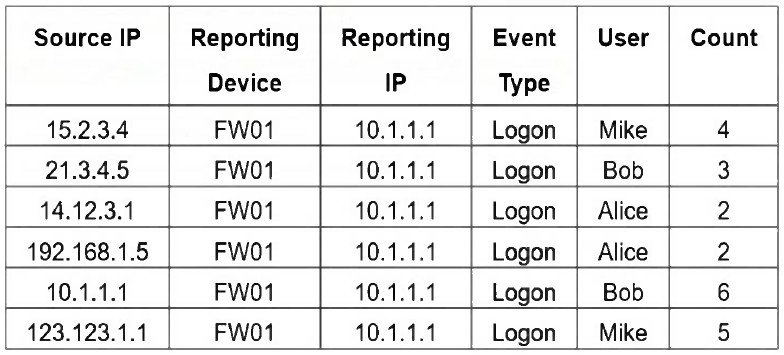
If you group the events by User and Count attributes, how many results will FortiSIEM display?

Show Answer Hide Answer
Correct Answer: D

The verified answer is D. Five. FortiSIEM grouping is based on unique combinations of the selected Group By fields. The Study Guide explains this behavior clearly: if multiple events have the same selected Group By values, ''they are grouped together in one row,'' and the count column tracks the number of events for each row. In this question, the selected fields are User and Count. The six raw rows contain these combinations: Mike/4, Bob/3, Alice/2, Alice/2, Bob/6, and Mike/5. Because Alice/2 appears twice, those two rows are grouped into a single result. The remaining combinations are unique. So FortiSIEM displays five grouped results, not six. Six would be correct only if every row had a unique User-and-Count combination, or if grouping included another differentiating attribute such as Source IP. Since the question specifically groups only by User and Count, duplicate User/Count pairs collapse into one row. Therefore, the correct result count is five.


Question No. 4

You want to create a rule with multiple subpatterns but trigger an incident only if three different subpatterns are matched over a 24-hour period.

Where must you define the time period that the rule uses to evaluate all the subpatterns? (Choose one answer)

Show Answer Hide Answer
Correct Answer: C

The time period must be defined under the Define Condition tab of the rule. The FortiSIEM Study Guide states that a rule has three components: General, Condition, and Action. The General section defines the overall purpose and scope of the rule, the Condition section specifies which conditions trigger the rule, and the Action section configures what happens after the rule is triggered. The Study Guide further explains that on the Define Condition page, FortiSIEM specifies ''the conditions---event attributes and thresholds---that will trigger the rule and create an incident,'' including ''the time window'' within which the subpatterns must match for the rule condition to be satisfied. It also states that when there is more than one subpattern, you must define the logic between subpatterns and their relationships or constraints.

For a 24-hour multiple-subpattern rule, the guide gives an example using an 86400-second time window, which equals 24 hours, and shows it under Resource > Rules > Define Condition. Therefore, the time period is not configured inside each individual subpattern, not under General, and not under Define Action.


Question No. 5

Refer to the exhibit.

Which section contains the subpattern configuration that determines how many matching events are needed to trigger the rule?

Show Answer Hide Answer
Correct Answer: A

The Aggregate section contains the condition COUNT(Matched Events) >= 1, which defines how many events must match the filter criteria for the rule to trigger. This is the subpattern configuration that determines the event threshold.

The correct answer is A. Aggregate. In FortiSIEM rule subpatterns, the Filter section defines which events are eligible for matching, but the Aggregate section defines the statistical or threshold condition that must be satisfied before the subpattern is considered matched. The Study Guide explains that rule conditions are built from subpatterns of event attribute filters and aggregation functions. It also states that a single-subpattern rule is formed by three fields: filters, aggregate, and group by. In the exhibit, the aggregate line is COUNT(Matched Events) >= 1. That expression directly specifies the number of matching events required to satisfy the subpattern. Group By only controls how matching events are partitioned into separate evaluation groups. Actions define what happens after a rule triggers, such as incident generation or notification. Filters define the event type or attribute criteria, but they do not define the required count threshold. Therefore, the section that determines how many matching events are needed is the Aggregate section.


Unlock All Questions for Fortinet NSE6_FSM_AN-7.4 Exam

Full Exam Access, Actual Exam Questions, Validated Answers, Anytime Anywhere, No Download Limits, No Practice Limits

Get All 48 Questions & Answers