
Trusted Worldwide Questions & Answers
Most Recent Fortinet NSE7_NST-7.2 Exam Dumps
Prepare for the Fortinet NSE 7 - Network Security 7.2 Support Engineer exam with our extensive collection of questions and answers. These practice Q&A are updated according to the latest syllabus, providing you with the tools needed to review and test your knowledge.
QA4Exam focus on the latest syllabus and exam objectives, our practice Q&A are designed to help you identify key topics and solidify your understanding. By focusing on the core curriculum, These Questions & Answers helps you cover all the essential topics, ensuring you're well-prepared for every section of the exam. Each question comes with a detailed explanation, offering valuable insights and helping you to learn from your mistakes. Whether you're looking to assess your progress or dive deeper into complex topics, our updated Q&A will provide the support you need to confidently approach the Fortinet NSE7_NST-7.2 exam and achieve success.
The questions for NSE7_NST-7.2 were last updated on Mar 2, 2026.
- Viewing page 1 out of 8 pages.
- Viewing questions 1-5 out of 40 questions
Exhibit.
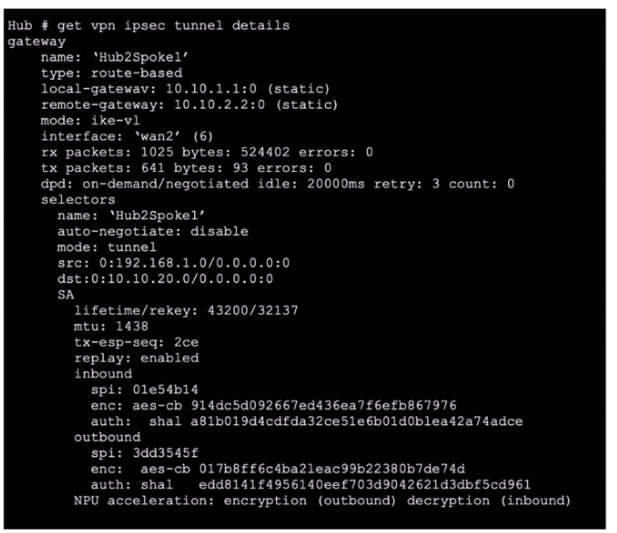
Refer to the exhibit, which contains the partial output of the get vpn ipsec tunnel details command. Based on the output, which two statements are correct? (Choose two.)
Anti-replay Enabled:
The exhibit shows replay: enabled, which confirms that anti-replay is enabled for this IPsec tunnel. Anti-replay is a security feature that prevents replay attacks by ensuring that packets are not duplicated or reused.
NPU Acceleration:
The NPU acceleration: encryption (outbound) decryption (inbound) line indicates that Network Processing Unit (NPU) acceleration is used.
The npu_flag for this tunnel is 02. This indicates that encryption and decryption are handled by the NPU, improving the performance of the VPN tunnel.
Fortinet Documentation: Verifying IPsec VPN Tunnels (Fortinet Docs) (Fortinet Docs).
Which statement about IKE and IKE NAT-T is true?
IKE (Internet Key Exchange): IKE is a protocol used to set up a security association (SA) in the IPsec protocol suite. It is utilized to negotiate, create, and manage SAs.
NAT-T (Network Address Translation-Traversal): NAT-T is used to enable IPsec VPN traffic to pass through NAT devices. It encapsulates IPsec ESP packets into UDP packets.
Transport Protocol: Both IKE and IKE NAT-T use UDP as their transport protocol.
Port Numbers: By default, IKE uses UDP port 500. NAT-T typically uses UDP port 4500. However, these port numbers can be configured as needed.
Fortinet Network Security Support Engineer Study Guide for FortiOS 7.2 (Fortinet Docs) (ebin.pub).
Fortinet Documentation on IPsec VPN Configuration (Fortinet Docs).
Exhibit.
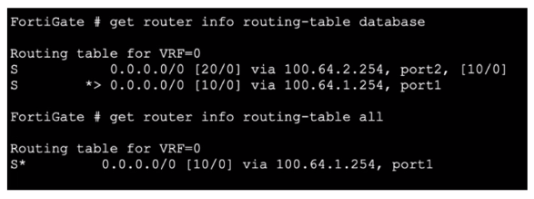
Refer to the exhibit, which shows partial outputs from two routing debug commands.
Why is the port 2 default route not in the second command output?
Routing Table Analysis:
The first command output (get router info routing-table database) shows two default routes:
One via port1 with a distance of 10.
One via port2 with a distance of 20.
The second command output (get router info routing-table all) only shows the route via port1.
Administrative Distance:
The administrative distance (AD) is a measure used by routers to select the best path when there are multiple routes to the same destination. The lower the distance, the more preferred the route.
In this scenario, the route via port1 has a lower distance (10) compared to the route via port2 (20), making it the preferred route.
Route Selection:
Since the route via port1 has a lower distance, it is the only one installed in the active routing table, which is why it appears in the second command output, and the port2 route does not.
Fortinet GURU: Route priority and administrative distance explanations (Fortinet GURU).
Refer to the exhibit, which shows the output of a diagnose command.
What can you conclude from the RTT value?
RTT (Round Trip Time):
RTT in the context of the FortiGuard server list indicates the time it takes for a request to be sent to a FortiGuard server and for a response to be received.
This metric helps determine the latency between the FortiGate device and the FortiGuard servers, which is crucial for ensuring efficient and quick updates and responses for services like web filtering and antivirus updates.
Server Selection:
The FortiGate device uses RTT values to prioritize servers. Servers with lower RTT values are preferred as they respond faster, ensuring minimal delay in processing requests.
This improves the overall performance of FortiGuard services by reducing the time it takes to communicate with the servers.
Which two statements about application-layer test commands ate true? (Choose two.)
Statistics and Configuration Information:
Application-layer test commands can display detailed statistics and configuration information about specific features or processes. For example, commands like diagnose vpn ipsec tunnel list provide detailed statistics about VPN tunnels.
Real-time Debugs:
These commands also facilitate real-time debugging of applications and processes. For instance, using diagnose debug application followed by the specific application, such as fssod, provides real-time debug information which is crucial for troubleshooting.
Fortinet Documentation: Application-layer Test Commands (Fortinet GURU).
Unlock All Questions for Fortinet NSE7_NST-7.2 Exam
Full Exam Access, Actual Exam Questions, Validated Answers, Anytime Anywhere, No Download Limits, No Practice Limits
Get All 40 Questions & Answers