
Trusted Worldwide Questions & Answers
Most Recent Fortinet NSE7_PBC-7.2 Exam Dumps
Prepare for the Fortinet NSE 7 - Public Cloud Security 7.2 exam with our extensive collection of questions and answers. These practice Q&A are updated according to the latest syllabus, providing you with the tools needed to review and test your knowledge.
QA4Exam focus on the latest syllabus and exam objectives, our practice Q&A are designed to help you identify key topics and solidify your understanding. By focusing on the core curriculum, These Questions & Answers helps you cover all the essential topics, ensuring you're well-prepared for every section of the exam. Each question comes with a detailed explanation, offering valuable insights and helping you to learn from your mistakes. Whether you're looking to assess your progress or dive deeper into complex topics, our updated Q&A will provide the support you need to confidently approach the Fortinet NSE7_PBC-7.2 exam and achieve success.
The questions for NSE7_PBC-7.2 were last updated on Apr 24, 2026.
- Viewing page 1 out of 12 pages.
- Viewing questions 1-5 out of 59 questions
Your goal is to deploy resources in multiple places and regions in the public cloud using Terraform.
What is the most efficient way to deploy resources without changing much of the Terraform code?
When deploying resources in multiple places and regions in the public cloud using Terraform, the most efficient way is:
A . Use multiple terraform.tfvars files with a variables.tf file.
Terraform.tfvars File: This file is used to assign values to variables defined in your Terraform configuration. By having multiple .tfvars files, you can define different sets of values for different deployments, such as for different regions or environments, without changing the main configuration.
Variables.tf File: This file contains the definition of variables that will be used within your Terraform configuration. It works in conjunction with terraform.tfvars files, allowing you to parameterize your configuration so that you can deploy the same template in multiple environments with different variables.
Which two attachments are necessary to connect a transit gateway to an existing VPC with BGP? (Choose two )
The correct answer is A and C. A transport attachment and a connect attachment are necessary to connect a transit gateway to an existing VPC with BGP.
According to the AWS documentation for Transit Gateway, a transit gateway is a network transit hub that connects VPCs and on-premises networks. To connect a transit gateway to an existing VPC with BGP, you need to do the following steps:
Create a transport attachment. A transport attachment is a resource that connects a VPC or VPN to a transit gateway. You can specify the BGP options for the transport attachment, such as the autonomous system number (ASN) and the BGP peer IP address.
Create a connect attachment. A connect attachment is a resource that enables you to use your own appliance to provide network services for traffic that flows through the transit gateway. You can use a connect attachment to route traffic between the transport attachment and your appliance using GRE tunnels and BGP.
The other options are incorrect because:
A BGP attachment is not a valid type of attachment for a transit gateway. BGP is a protocol that enables dynamic routing between the transit gateway and the VPC or VPN.
A GRE attachment is not a valid type of attachment for a transit gateway. GRE is a protocol that encapsulates packets for tunneling purposes. GRE tunnels are established between the connect attachment and your appliance.
: [Transit Gateways - Amazon Virtual Private Cloud] : [Transit Gateway Connect - Amazon Virtual Private Cloud]
Refer to Exhibit:
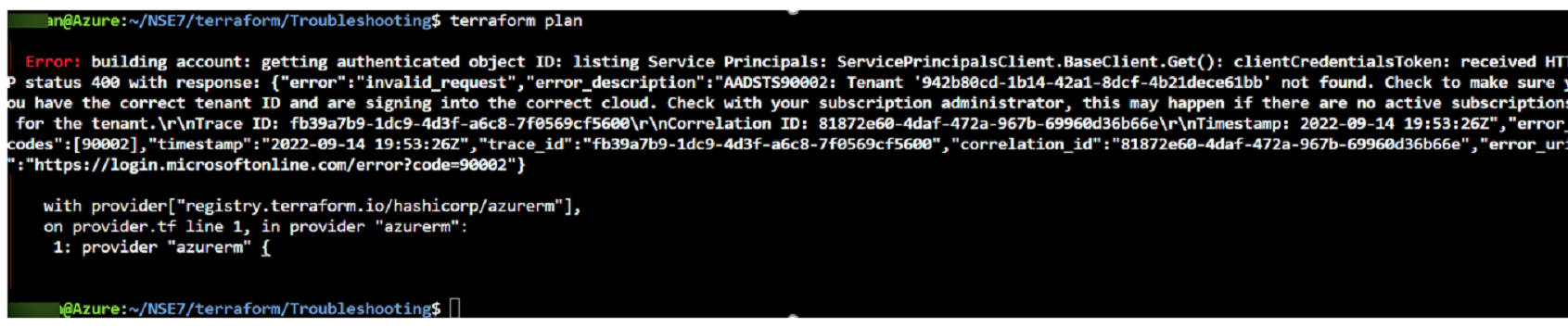
After the initial Terraform configuration in Microsoft Azure, the terraform plan command is run Which two statements about running the plan command are true? (Choose two.)
Which two Amazon Web Services (AWS) features support east-west traffic inspection within the AWS cloud by the FortiGate VM? (Choose two.)
The correct answer is B and D. A transit gateway with an attachment and a transit VPC support east-west traffic inspection within the AWS cloud by the FortiGate VM.
The other options are incorrect because:
Refer to the exhibit
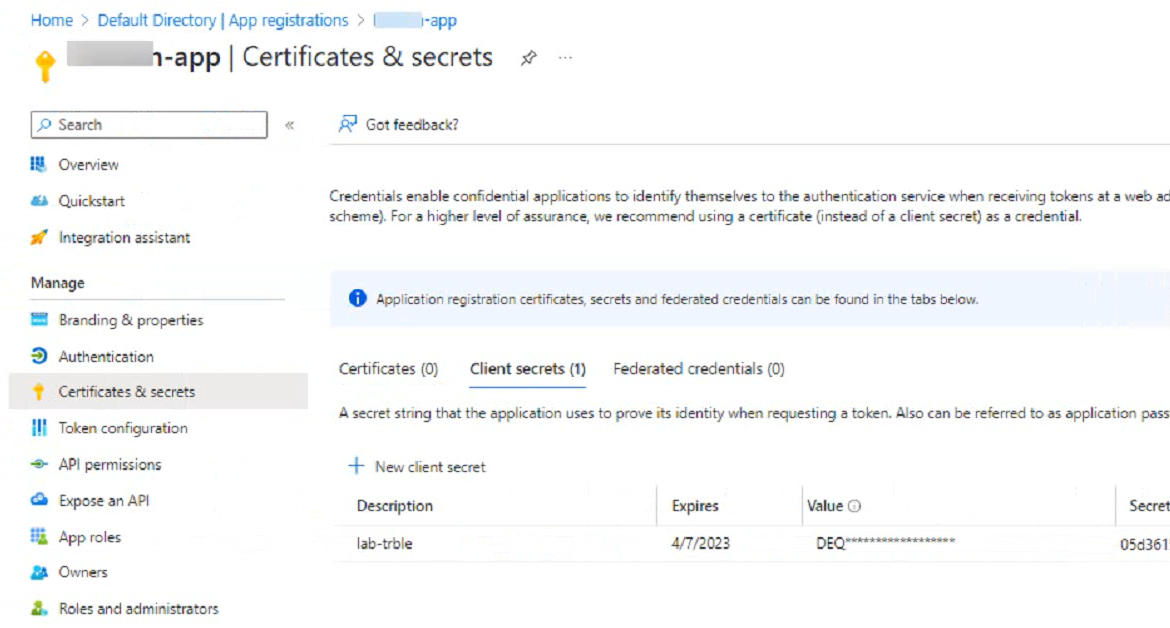
An administrator is trying to deploy a FortiGate VM in Microsoft Azure using Terraform However, during the configuration, the Azure client secret is no longer visible in the Azure portal.
How would the administrator obtain the Azure
client secret to configure on Terratorm?
Sign in to the Azure portal and navigate to the Azure Active Directory service.
Select the application name under the App Registrations.
Select Certificates & Secrets > New client secret to create a new client secret.
Add a description and an expiration date for the client secret and select Add.
Copy the value of the new client secret immediately as it will not be shown again.
Generate new Client Secret and link to key-vault | Microsoft Learn
Azure Quickstart - Set and retrieve a secret from Key Vault using Azure portal | Microsoft Learn
Unlock All Questions for Fortinet NSE7_PBC-7.2 Exam
Full Exam Access, Actual Exam Questions, Validated Answers, Anytime Anywhere, No Download Limits, No Practice Limits
Get All 59 Questions & Answers