
Trusted Worldwide Questions & Answers
Most Recent GitHub-Actions Exam Dumps
Prepare for the GitHub Actions Certificate Exam exam with our extensive collection of questions and answers. These practice Q&A are updated according to the latest syllabus, providing you with the tools needed to review and test your knowledge.
QA4Exam focus on the latest syllabus and exam objectives, our practice Q&A are designed to help you identify key topics and solidify your understanding. By focusing on the core curriculum, These Questions & Answers helps you cover all the essential topics, ensuring you're well-prepared for every section of the exam. Each question comes with a detailed explanation, offering valuable insights and helping you to learn from your mistakes. Whether you're looking to assess your progress or dive deeper into complex topics, our updated Q&A will provide the support you need to confidently approach the GitHub-Actions exam and achieve success.
The questions for GitHub-Actions were last updated on Sep 21, 2026.
- Viewing page 1 out of 14 pages.
- Viewing questions 1-5 out of 72 questions
As a developer, you are optimizing a GitHub workflow that uses and produces many different files. You need to determine when to use caching versus workflow artifacts. Which two statements are true? (Choose two.)
Caching is ideal for files that change rarely, such as dependencies or build outputs, as it speeds up subsequent workflow runs by reusing previously cached files instead of re-downloading or rebuilding them.
Artifacts are used for persisting files produced during a job that need to be used in later jobs or after the workflow has ended, allowing them to be downloaded or referenced later.
As a DevOps engineer, you are trying to leverage an organization secret in a repo. The value received in the workflow is not the same as that set in the secret. What is the most likely reason for the difference?
GitHub secrets are defined at different levels: organization, repository, and sometimes at the workflow level. If a secret is defined at both the organization level and the repository level, the repository-level secret will take precedence. So, if the value of the secret differs between these levels, the workflow will use the value from the repository level instead of the organization level.
Based on the YAML below, which two statements are correct? (Choose two.)
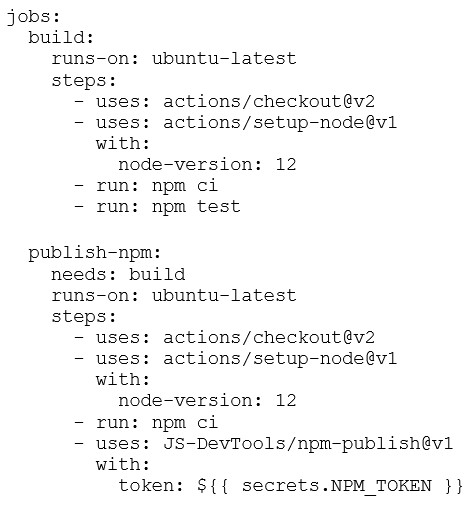
The publish-npm job includes the JS-DevTools/npm-publish action, which is used to publish an npm package to an npm registry.
The publish-npm job has the needs: build directive, meaning it will only run after the build job successfully completes.
You need to make a script to retrieve workflow run logs via the API. Which is the correct API to download a workflow run log?
The GET /repos/:owner/:repo/actions/runs/:run_id/logs API endpoint is used to retrieve the logs of a specific workflow run identified by run_id. This is the correct method for downloading logs from a workflow run.
As a developer, you have a 10-MB data set that is required in a specific workflow. Which steps should you perform so the dataset is stored encrypted and can be decrypted during the workflow? (Choose three.)
First, the dataset should be encrypted before being stored. This ensures that the data is protected when stored in a repository.
The encrypted dataset can be stored in a GitHub secret, ensuring it is securely kept and not exposed publicly.
The encryption key needed to decrypt the dataset should also be stored in a GitHub secret to maintain security during the workflow, allowing access only when needed.
Unlock All Questions for GitHub GitHub-Actions Exam
Full Exam Access, Actual Exam Questions, Validated Answers, Anytime Anywhere, No Download Limits, No Practice Limits
Get All 72 Questions & Answers