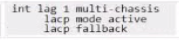
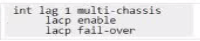
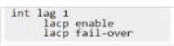
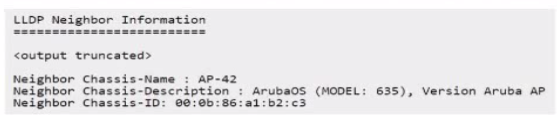
Which set of commands will apply the device profile 'AP' to the device shown in the LLDP neighbor output below?
A)
B)
C)
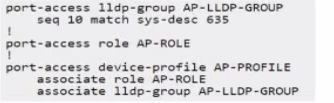
D)
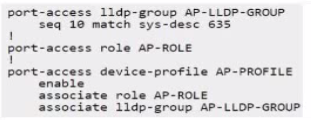
The goal is to configure the switch to automatically apply a specific device profile (named AP-PROFILE in the options) to ports where an Aruba AP Model 635 connects, using LLDP information for detection.
LLDP Information: The LLDP neighbor output shows:
Neighbor Chassis-Description: ArubaOS (MODEL: 635), Version Aruba AP
Neighbor Chassis-Name: AP-42
Device Profile Mechanism: This involves creating an LLDP group that matches specific attributes of the desired device, creating a device profile containing the desired port configurations (VLAN, PoE, QoS, Role, etc.), associating the profile with the LLDP group, and enabling the feature globally.
Analyzing Configuration Options: All options configure an LLDP group AP-LLDP-GROUP and a device profile AP-PROFILE. The key is the matching condition within the LLDP group and the completeness of the profile configuration.
Matching Condition:
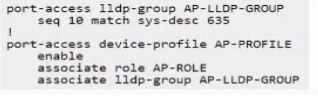
Options A, C, D use seq 10 match sys-desc 635. This condition checks if the LLDP System Description contains the string '635'. Based on the output (...MODEL: 635...), this condition will match the target AP.
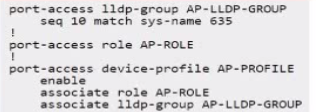
Option B uses seq 10 match sys-name 635. This checks if the LLDP System Name contains '635'. The output shows Neighbor Chassis-Name: AP-42. This condition will not match.