
Exhibit.
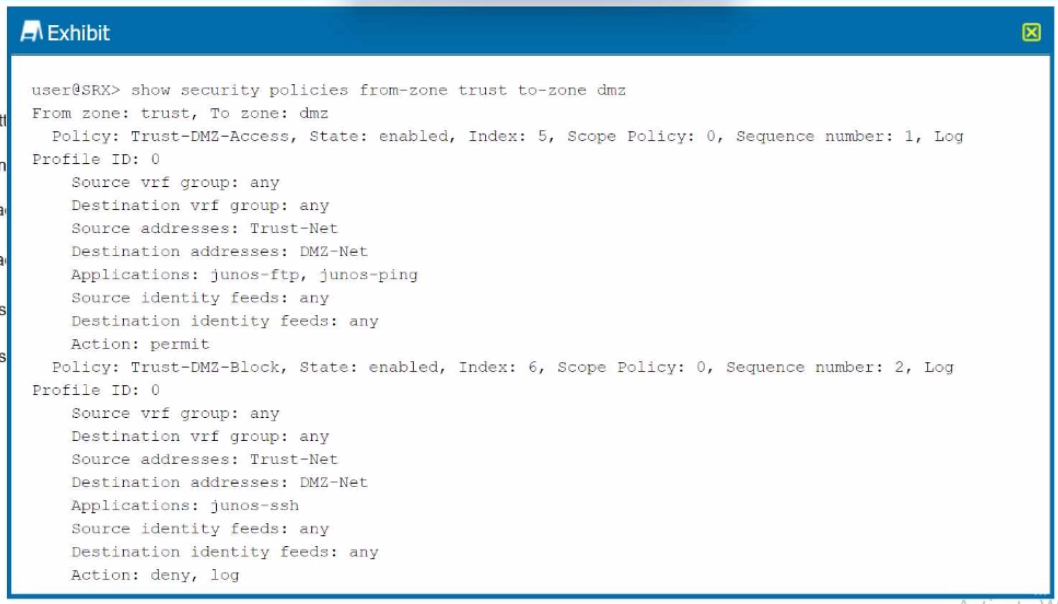
Which two statements are correct referring to the output shown in the exhibit? (Choose two.)
Understanding the Policies in the Exhibit: The exhibit displays two policies configured on the Juniper SRX device for traffic between the trust zone and the dmz zone.
Policy 1:
Name: Trust-DMZ-Access
State: Enabled
Source Address: Trust-Net
Destination Address: DMZ-Net
Applications: junos-ftp, junos-ping
Action: permit
Log: Enabled
Policy 2:
Name: Trust-DMZ-Block
State: Enabled
Source Address: Trust-Net
Destination Address: DMZ-Net
Applications: junos-ssh
Action: deny, log
Analysis of Each Option:
Option A:
The Trust-DMZ-Access policy explicitly permits traffic for the junos-ftp and junos-ping applications.
This is validated by the action permit in the policy configuration.
Correct.
Option B:
This is incorrect because the Trust-DMZ-Access policy permits FTP and ping traffic rather than denying it.
Incorrect.
Option C:
The Trust-DMZ-Block policy explicitly denies traffic for the junos-ssh application.
Therefore, SSH access is not permitted.
Incorrect.
Option D:
The Trust-DMZ-Block policy denies SSH traffic from the Trust-Net to the DMZ-Net.
This is validated by the action deny.
Correct.
Juniper Security Reference:
Security Policy Overview: Security policies in Junos OS are used to control and filter traffic between security zones. Each policy defines:
Source and destination zones
Source and destination addresses
Applications or services
Action: permit, deny
Logging options
Policy Action Details:
permit: Allows the specified traffic.
deny: Blocks the specified traffic.
Application Identification:
Juniper SRX uses predefined application identifiers (junos-ftp, junos-ping, junos-ssh) for traffic matching.
Policy Evaluation Order: Policies are evaluated in sequence by their index number or sequence number. In this exhibit:
Trust-DMZ-Access is evaluated first (Sequence number: 1).
Trust-DMZ-Block is evaluated next (Sequence number: 2).
Conclusion: Based on the exhibit, FTP and ping traffic is permitted under Trust-DMZ-Access, and SSH traffic is denied under Trust-DMZ-Block. The answers to the question are therefore:
A . Correct
D . Correct
Refer to the Juniper Security Policy Documentation for more details on configuring and managing policies.