Prepare for the Microsoft Azure Administrator Exam exam with our extensive collection of questions and answers. These practice Q&A are updated according to the latest syllabus, providing you with the tools needed to review and test your knowledge.
QA4Exam focus on the latest syllabus and exam objectives, our practice Q&A are designed to help you identify key topics and solidify your understanding. By focusing on the core curriculum, These Questions & Answers helps you cover all the essential topics, ensuring you're well-prepared for every section of the exam. Each question comes with a detailed explanation, offering valuable insights and helping you to learn from your mistakes. Whether you're looking to assess your progress or dive deeper into complex topics, our updated Q&A will provide the support you need to confidently approach the Microsoft AZ-104 exam and achieve success.
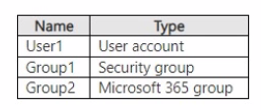
You have an Azure Subscription that contains the virtual networks Shown in the following table.

All the virtual networks are peered. Each virtual network contains nine virtual machines.
You need to configure secure RDP corrections to the virtual machines by using Azure Boston.
Whit is the minimum number of Bastion nests required?
According to theMicrosoft documentation, Azure Bastion is a service that provides more secure and seamless RDP and SSH access to virtual machines without any exposure through public IP addresses. You can provision the service directly in your local or peered virtual network to get support for all the VMs within it.
In your scenario, you have three virtual networks that are peered with each other. This means that they can communicate with each other as if they were in the same virtual network. Therefore, you can deploy one Bastion host in any of the virtual networks and use it to connect to all the virtual machines in the peered virtual networks. You don't need to deploy a separate Bastion host for each virtual network or each virtual machine.
For more information about how to deploy and use Azure Bastion, seeTutorial: Deploy Bastion using specified settings: Azure portal.
You have an Azure subscription that contains a storage account named account1.
You plan to upload the disk files of a virtual machine to account! from your on-premises network. The on-premises network uses a public IP address space of 131.107.1.0/24.
You plan to use the disk files to provision an Azure virtual machine named VM1. VM1 will be attached to a virtual network named VNet1. VNet1 uses an IP address space of 192.168.0.0/24.
You need to configure account1 to meet the following requirements:
* Ensure that you can upload the disk files to account1.
* Ensure that you can attach the disks to VM1.
* Prevent all other access to account1.
Which two actions should you perform? Each correct answer presents part of the solution. NOTE: Each correct selection is worth one point.
To restrict access to account1, you need to enable the firewall and virtual network settings on the storage account. This allows you to specify which networks can access the storage account. By selecting Selected networks, you can block all access from the public internet and only allow access from the specified networks. By adding VNet1, you can allow access from the virtual network that contains VM1. You do not need to add the on-premises IP address range or enable the service endpoint option, as these are not required for uploading the disk files to the storage account. You do not need to allow trusted Microsoft services, as this is not relevant for the scenario. Then, Reference: [Configure Azure Storage firewalls and virtual networks] [Upload a generalized VHD to Azure]
You have an Azure subscription that contains a storage account. The account stores website data.
You need to ensure that inbound user traffic uses the Microsoft point-of-presence (POP) closest to the user's location.
What should you configure?
Routing preference is a feature that allows you to configure how network traffic is routed to your storage account from clients over the internet. By default, traffic from the internet is routed to the public endpoint of your storage account over the Microsoft global network, which is optimized for low-latency path selection and high reliability. Both inbound and outbound traffic are routed through the point of presence (POP) that is closest to the client. This ensures that traffic to and from your storage account traverses over the Microsoft global network for the bulk of its path, maximizing network performance. You can also change the routing preference to use internet routing, which minimizes the traversal of your traffic over the Microsoft global network, handing it off to the transit ISP at the earliest opportunity. This lowers networking costs, but may compromise network performance. Therefore, to ensure that inbound user traffic uses the Microsoft POP closest to the user's location, you should configure routing preference to use the Microsoft global network as the default routing option for your storage account.
Network routing preference for Azure Storage
Configure network routing preference for Azure Storage
Note: This question is part of a series of questions that present the same scenario. Each question in the series contains a unique solution that might meet the stated goals. Some question sets might have more than one correct solution, while others might not have a correct solution.
After you answer a question in this section, you will NOT be able to return to it. As a result, these questions will not appear in the review screen.
You have an Azure subscription that contains 10 virtual networks. The virtual networks are hosted in separate resource groups.
Another administrator plans to create several network security groups (NSGs) in the subscription.
You need to ensure that when an NSG is created, it automatically blocks TCP port 8080 between the virtual networks.
Solution: From the Resource providers blade, you unregister the Microsoft.ClassicNetwork provider.
Does this meet the goal?
No, this does not meet the goal. Unregistering the Microsoft.ClassicNetwork provider does not affect the creation of network security groups (NSGs) in the subscription.The Microsoft.ClassicNetwork provider is used for managing classic deployment model resources, such as virtual networks, network interfaces, and public IP addresses1.However, NSGs are only supported for Resource Manager deployment model resources2. Therefore, unregistering the Microsoft.ClassicNetwork provider will not automatically block TCP port 8080 between the virtual networks.
To meet the goal, you need to create a custom policy definition that enforces a default security rule for NSGs.A policy definition is a set of rules and actions that Azure performs when evaluating your resources3. You can use a policy definition to specify the required properties and values for NSGs, such as the direction, protocol, source, destination, and port of the security rule. You can then assign the policy definition to the subscription scope, so that it applies to all the resource groups and virtual networks in the subscription.
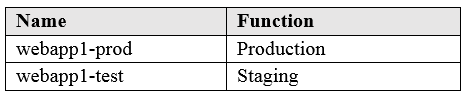
You have an Azure subscription that contains two resource groups named RG1 and RG2. RG1 contains the resources shown in the following table.

You move VM1 to RG2.
Which resources are in RG2 after the move?
When you move an Azure virtual machine to another resource group, Azure Resource Manager treats the virtual machine as a resource that has required dependencies. For an IaaS VM, the VM resource depends on its network interface (NIC) for connectivity and its managed disks (OS disk and any data disks) for storage. Microsoft Azure Administrator guidance for resource moves explains that a move operation must include any dependent resources that are required for the resource to function after the move. If you attempt to move only the VM object while leaving required dependencies behind, the move would be blocked or the VM would be left in a nonfunctional state.
In this scenario, NIC1 is the network interface used by VM1, and Disk1 is the OS disk used by VM1; both are core dependencies and are moved along with the VM. VNet1 is a separate networking resource that typically hosts multiple subnets and can be shared by many resources; it is not required to move to move a VM, and moving the VNet would be unnecessary and potentially disruptive. Therefore, after moving VM1 from RG1 to RG2, the resources present in RG2 are VM1, NIC1, and Disk1, but not VNet1.
Full Exam Access, Actual Exam Questions, Validated Answers, Anytime Anywhere, No Download Limits, No Practice Limits
Get All 429 Questions & Answers