
Trusted Worldwide Questions & Answers
Most Recent Microsoft AZ-802 Exam Dumps
Prepare for the Microsoft Administering Windows Server exam with our extensive collection of questions and answers. These practice Q&A are updated according to the latest syllabus, providing you with the tools needed to review and test your knowledge.
QA4Exam focus on the latest syllabus and exam objectives, our practice Q&A are designed to help you identify key topics and solidify your understanding. By focusing on the core curriculum, These Questions & Answers helps you cover all the essential topics, ensuring you're well-prepared for every section of the exam. Each question comes with a detailed explanation, offering valuable insights and helping you to learn from your mistakes. Whether you're looking to assess your progress or dive deeper into complex topics, our updated Q&A will provide the support you need to confidently approach the Microsoft AZ-802 exam and achieve success.
The questions for AZ-802 were last updated on Sep 23, 2026.
- Viewing page 1 out of 102 pages.
- Viewing questions 1-5 out of 510 questions
Note: This question is part of a series of questions that present the same scenario. Each question in the series contains a unique solution that might meet the stated goals. Your network contains an Active Directory Domain Services (AD DS) domain. The domain contains servers that run Windows Server and store BitLocker recovery keys in AD DS. A server named Server1 starts in BitLocker recovery mode. You need to identify the BitLocker recovery key for Server1. Solution: You run ntdsutil.exe on a domain controller. Does this meet the goal?
ntdsutil.exe is a command-line management utility for the AD DS database itself, used for tasks such as performing authoritative restores, seizing or transferring FSMO roles, database integrity checks and defragmentation, managing application directory partitions, and Directory Services Restore Mode password resets; it has no built-in command, menu, or capability for browsing individual object attributes such as the ms-FVE-RecoveryPassword value stored on a msFVE-RecoveryInformation child object, and it provides no interface at all for reading or exporting BitLocker recovery data. Retrieving a BitLocker recovery password stored in AD DS requires either the BitLocker Recovery Password Viewer snap-in for Active Directory Users and Computers, which adds a dedicated tab to a computer object's properties specifically to display associated recovery passwords, or direct inspection of the msFVE-RecoveryInformation child objects through a general-purpose LDAP tool such as ADSI Edit or an equivalent PowerShell query against the directory; ntdsutil operates at the database/role-management level and simply has no code path that surfaces this attribute value to an administrator. Because running ntdsutil.exe on a domain controller does not read, display, or export any BitLocker recovery password, and no combination of its available commands can be used to obtain one, this solution does not meet the stated goal of identifying Server1's recovery key.
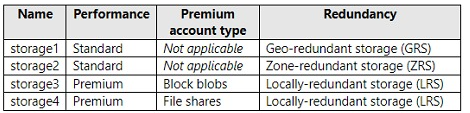
You have an Azure subscription. The subscription contains a virtual machine named VM1 that runs Windows Server. The subscription contains the storage accounts shown in the following table: storage1 (Standard, GRS), storage2 (Standard, ZRS), storage3 (Premium, Block blobs, LRS), storage4 (Premium, File shares, LRS). You plan to enable boot diagnostics for VM1. You need to configure storage for the boot diagnostics logs and snapshots. Which storage account should you use?
Storage accounts table
The storage account used for Azure virtual machine boot diagnostics must be a standard-performance-tier account, since Microsoft documents that attempting to use a premium storage account for boot diagnostics returns a StorageAccountTypeNotSupported error when the virtual machine is started, and it also cannot use zone-redundant storage, since ZRS is likewise unsupported for this specific resource and produces the same class of error. Looking at the four accounts in the table, storage3 and storage4 are both Premium-tier accounts, which immediately rules both of them out regardless of their redundancy setting, and storage2, despite being Standard tier, uses zone-redundant storage, which independently rules it out as well. That leaves storage1, which is both Standard performance tier and uses geo-redundant storage rather than zone-redundant storage, satisfying both documented requirements simultaneously. Because storage1 is the only one of the four accounts that avoids both the premium-tier restriction and the ZRS restriction at the same time, it is the only valid choice among the options offered for configuring VM1's boot diagnostics storage.
You have 200 Azure virtual machines. You create a recovery plan in Azure Site Recovery to fail over all the virtual machines to an Azure region. The plan has three manual actions. You need to replace one of the manual actions with an automated process. What should you use?
Azure Site Recovery recovery plans support inserting automated steps before or after each failover group within the plan, and the mechanism used to run that automation is an Azure Automation runbook invoked directly from the recovery plan. Runbooks can call Azure Resource Manager operations, PowerShell workflows, or other custom orchestration logic, which makes them a natural fit for replacing a manual step such as reconfiguring a load balancer, updating DNS records, or validating application health once the 200 virtual machines have failed over. An Azure Desired State Configuration virtual machine extension enforces configuration state on a running VM rather than integrating with the recovery plan's action framework, an Azure PowerShell function run outside of Automation has no native hook point within a recovery plan, and a Custom Script Extension executes a script inside a VM rather than as an orchestrated recovery-plan action. Because Azure Automation runbooks are the specific, documented integration point Site Recovery recovery plans use for automating manual actions, that is the correct choice for automating one of the plan's three manual steps.
You have an Azure subscription. The subscription contains a virtual machine named VM1 that runs Windows Server and has the following disks: * OS disk: Disk1 -- Size: 512 GiB, Free space: 260 GiB, Encryption: SSE with PMK, Storage type: Standard SSD * Data disk: Disk2 -- Size: 512 GiB, Free space: 45 GiB, Storage type: Standard HDD, Encryption: Platform-managed key You are planning a maintenance strategy for VM1. You need to identify which task can be performed on Disk2 without causing downtime to VM1. What should you do on Disk2?
Azure managed disks support expanding (increasing) a data disk's size without deallocating the VM, and Microsoft's documentation confirms this applies to Standard HDD, Standard SSD, and Premium SSD disks as long as the resize stays at or below 4 TiB (crossing the 4 TiB boundary does require deallocating and detaching first; Premium SSD v2 and Ultra Disk have no such restriction at any size). Disk2 is a 512 GiB Standard HDD data disk, well under the 4 TiB threshold, so increasing its size can be performed online, with no VM downtime. Decreasing (shrinking) an Azure managed disk's size is never supported at all, with or without downtime, regardless of disk type, due to the risk of data loss -- the only workaround is creating a new, smaller disk and copying the data across, not an in-place shrink. Changing a managed disk's encryption type (for example, switching between platform-managed and customer-managed keys) and changing its storage type (for example, from Standard HDD to Premium SSD) are both operations that Microsoft documents as requiring the VM to be stopped/deallocated (and, in many cases, the disk detached) before the change can be applied, since these operations affect how the disk is provisioned and served at the storage layer. Therefore, among the four choices, only increasing Disk2's size can be performed without causing downtime to VM1.
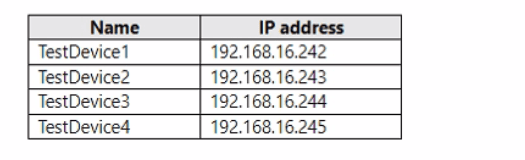
You have four testing devices that are configured with static IP addresses as shown in the following table: TestDevice1 (192.168.16.242), TestDevice2 (192.168.16.243), TestDevice3 (192.168.16.244), TestDevice4 (192.168.16.245). The test devices are turned on once a month. You need to prevent Server1 from assigning the IP addresses allocated to the test devices to other devices when the test devices are offline. The solution must minimize administrative effort. What should you do?
Test device static IP table
Because the four test devices use manually configured static IP addresses rather than addresses leased from the DHCP server, they never register a DHCP client lease or reservation binding tied to their MAC address; the DHCP server (Server1) has no built-in awareness that those addresses are already statically claimed. A DHCP reservation ensures a specific DHCP client (identified by MAC address) always receives the same address when it requests one via DHCP -- it does not protect addresses a device has been configured with statically outside of DHCP, so reserving addresses for devices that never request a DHCP lease has no protective effect. The simplest, lowest-effort fix that actually addresses the problem -- Server1 potentially leasing those same four addresses to other DHCP clients while the test devices are powered off -- is to add an exclusion range covering those four addresses, permanently removing them from the pool Server1 can hand out, regardless of whether the test devices are online or offline. Scope options configure settings such as default gateway or DNS servers delivered with a lease and have no bearing on which addresses get leased. Policies allow conditional assignment of options or ranges based on client criteria (such as vendor class), unnecessary complexity for simply reserving four fixed addresses out of the pool. Therefore, creating an exclusion range for the four addresses is the correct, minimal-effort solution.
Unlock All Questions for Microsoft AZ-802 Exam
Full Exam Access, Actual Exam Questions, Validated Answers, Anytime Anywhere, No Download Limits, No Practice Limits
Get All 510 Questions & Answers