Prepare for the Microsoft Designing and Implementing Enterprise-Scale Analytics Solutions Using Microsoft Azure and Microsoft Power BI exam with our extensive collection of questions and answers. These practice Q&A are updated according to the latest syllabus, providing you with the tools needed to review and test your knowledge.
QA4Exam focus on the latest syllabus and exam objectives, our practice Q&A are designed to help you identify key topics and solidify your understanding. By focusing on the core curriculum, These Questions & Answers helps you cover all the essential topics, ensuring you're well-prepared for every section of the exam. Each question comes with a detailed explanation, offering valuable insights and helping you to learn from your mistakes. Whether you're looking to assess your progress or dive deeper into complex topics, our updated Q&A will provide the support you need to confidently approach the Microsoft DP-500 exam and achieve success.
Actual Microsoft DP-500 Exam Questions
01Question 1
The group registers the Power Bl tenant as a data source1.
You need to ensure that all the analysts can view the assets in the Power Bl tenant The solution must meet the technical requirements for Microsoft Purview and Power BI.
What should you do?
Correct answer:A
02Question 2
You are using a Python notebook in an Apache Spark pool in Azure Synapse Analytics.
You need to present the data distribution statistics from a DataFrame in a tabular view.
Which method should you invoke on the DataFrame?
Correct answer:D
The aggregating statistic can be calculated for multiple columns at the same time with the describe function.
Example:
titanic[['Age', 'Fare']].describe()
Out[6]:
Age Fare
count 714.000000 891.000000
mean 29.699118 32.204208
std 14.526497 49.693429
min 0.420000 0.000000
25% 20.125000 7.910400
50% 28.000000 14.454200
75% 38.000000 31.000000
max 80.000000 512.329200
03Question 3
You are optimizing a dataflow in a Power Bl Premium capacity. The dataflow performs multiple joins. You need to reduce the load time of the dataflow.
Which two actions should you perform? Each correct answer presents part of the solution. NOTE: Each correct selection is worth one point.
Correct answer:C, E
Using the compute engine to improve performance
Take the following steps to enable workloads trigger the compute engine, and always improve performance:
For computed and linked entities in the same workspace:
Ensure you perform the operations that fold, such as merges, joins, conversion, and others.
For ingestion focus on getting the data into the storage as fast as possible, using filters only if they reduce the overall dataset size. It's best practice to keep your transformation logic separate from this step, and allow the engine to focus on the initial gathering of ingredients. Next, separate your transformation and business logic into a separate dataflow in the same workspace, using linked or computed entities; doing so allows for the engine to activate and accelerate your computations. In our analogy, it's like food preparation in the kitchen: food preparation is typically a separate and distinct step from gathering your raw ingredients, and a pre-requisite for putting the food in the oven. Similarly, your logic needs to be prepared separately before it can take advantage of the compute engine.
04Question 4
After you answer a question in this section, you will NOT be able to return to it. As a result, these questions will not appear in the review screen.
You are using an Azure Synapse Analytics serverless SQL pool to query a collection of Apache Parquet files by using automatic schema inference. The files contain more than 40 million rows of UTF-8-encoded business names, survey names, and participant counts. The database is configured to use the default collation.
The queries use open row set and infer the schema shown in the following table.
You need to recommend changes to the queries to reduce I/O reads and tempdb usage.
Solution: You recommend using openrowset with to explicitly specify the maximum length for businessName and surveyName.
Does this meet the goal?
Correct answer:B
Instead use Solution: You recommend using OPENROWSET WITH to explicitly define the collation for businessName and surveyName as Latin1_General_100_BIN2_UTF8.
Query Parquet files using serverless SQL pool in Azure Synapse Analytics.
Important
Ensure you are using a UTF-8 database collation (for example Latin1_General_100_BIN2_UTF8) because string values in PARQUET files are encoded using UTF-8 encoding. A mismatch between the text encoding in the PARQUET file and the collation may cause unexpected conversion errors. You can easily change the default collation of the current database using the following T-SQL statement: alter database current collate Latin1_General_100_BIN2_UTF8'.
Note: If you use the Latin1_General_100_BIN2_UTF8 collation you will get an additional performance boost compared to the other collations. The Latin1_General_100_BIN2_UTF8 collation is compatible with parquet string sorting rules. The SQL pool is able to eliminate some parts of the parquet files that will not contain data needed in the queries (file/column-segment pruning). If you use other collations, all data from the parquet files will be loaded into Synapse SQL and the filtering is happening within the SQL process. The Latin1_General_100_BIN2_UTF8 collation has additional performance optimization that works only for parquet and CosmosDB. The downside is that you lose fine-grained comparison rules like case insensitivity.
05Question 5
Note: This question is part of a series of questions that present the same scenario. Each question in the series contains a unique solution that might meet the stated goals. Some question sets might have more than one correct solution, while others might not have a correct solution.
After you answer a question in this section, you will NOT be able to return to ft. As a result, these questions will not appear in the review screen.
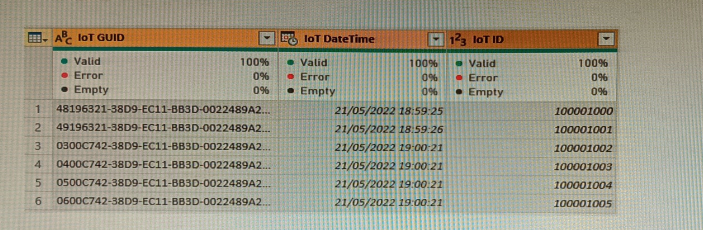
From Power Query Editor, you profile the data shown in the following exhibit.
The loT GUID and loT ID columns are unique to each row in the query.
You need to analyze loT events by the hour and day of the year. The solution must improve dataset performance.
Solution: You split the loT DateTime column into a column named Date and a column named Time.
Does this meet the goal?
Correct answer:B
→
Unlock all Microsoft DP-500 questions
Full exam access, validated answers, and unlimited practice with no download limits.