Prepare for the Palo Alto Networks Certified Network Security Consultant exam with our extensive collection of questions and answers. These practice Q&A are updated according to the latest syllabus, providing you with the tools needed to review and test your knowledge.
QA4Exam focus on the latest syllabus and exam objectives, our practice Q&A are designed to help you identify key topics and solidify your understanding. By focusing on the core curriculum, These Questions & Answers helps you cover all the essential topics, ensuring you're well-prepared for every section of the exam. Each question comes with a detailed explanation, offering valuable insights and helping you to learn from your mistakes. Whether you're looking to assess your progress or dive deeper into complex topics, our updated Q&A will provide the support you need to confidently approach the Palo Alto Networks PCNSC exam and achieve success.
How can you verify that a new security policy is correctly blocking traffic without disrupting the network?
Which feature allows you to use multiple links simultaneously to balance the load in a Palo Alto Networks firewall?
What is the maximum number of virtual systems supported by a Palo Alto Networks VM-300 firewall?
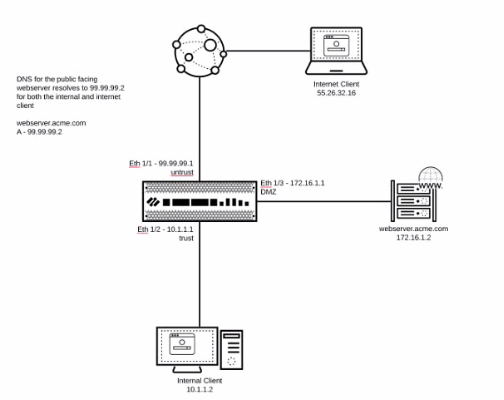
You are hosting a public-facing web server on your DMZ and access to that server is through a Palo Alto Networks firewall Both internal clients and internet clients access this web server using the FQDN public webserver acme com which resolves to the public address of 99.99 99.2
Which combination of NAT policies is necessary to enable access to the web server for both internal and internet clients?

A)

B)

C)

D)

To enable access to a public-facing web server for both internal and internet clients using the FQDN public.webserver.acme.com, which resolves to the public address 99.99.99.2, the necessary combination of NAT policies is:
C . Option C
Policy 11: DMZ to Untrust
Source Zone: DMZ
Destination Zone: Untrust
Destination Address: Web_Server_Public_99.99.99.2
Destination Translation: address: Web_Server_Private_172.16.1.2
Policy 12: Untrust to Untrust
Source Zone: Untrust
Destination Zone: Untrust
Destination Address: Web_Server_Public_99.99.99.2
Destination Translation: address: Web_Server_Private_172.16.1.2
These policies ensure that traffic destined for the public IP address 99.99.99.2 from both the DMZ and Untrust zones is properly translated to the internal web server's private IP address 172.16.1.2.
Palo Alto Networks - NAT Configuration: https://docs.paloaltonetworks.com/pan-os/10-0/pan-os-admin/networking/nat/nat-policy-rules
TAC has requested a PCAP on your Panorama lo see why the DNS app is having intermittent issues resolving FODN What is the appropriate CLI command1*
To capture a PCAP on your Panorama to troubleshoot DNS resolution issues, the appropriate CLI command is:
B . tcpdump snaplen 0 filter 'port 53'
This command captures packets with no size limit (snaplen 0) and filters the traffic for port 53, which is used by DNS. This is the most straightforward and comprehensive way to capture all DNS traffic for analysis.
Palo Alto Networks - Using tcpdump on PAN-OS: https://knowledgebase.paloaltonetworks.com
Palo Alto Networks - Troubleshooting Network Connectivity Issues: https://docs.paloaltonetworks.com
Full Exam Access, Actual Exam Questions, Validated Answers, Anytime Anywhere, No Download Limits, No Practice Limits
Get All 60 Questions & Answers