Prepare for the SAS Certified Specialist Administration of SAS Viya 3.5 exam with our extensive collection of questions and answers. These practice Q&A are updated according to the latest syllabus, providing you with the tools needed to review and test your knowledge.
QA4Exam focus on the latest syllabus and exam objectives, our practice Q&A are designed to help you identify key topics and solidify your understanding. By focusing on the core curriculum, These Questions & Answers helps you cover all the essential topics, ensuring you're well-prepared for every section of the exam. Each question comes with a detailed explanation, offering valuable insights and helping you to learn from your mistakes. Whether you're looking to assess your progress or dive deeper into complex topics, our updated Q&A will provide the support you need to confidently approach the SAS A00-251 exam and achieve success.
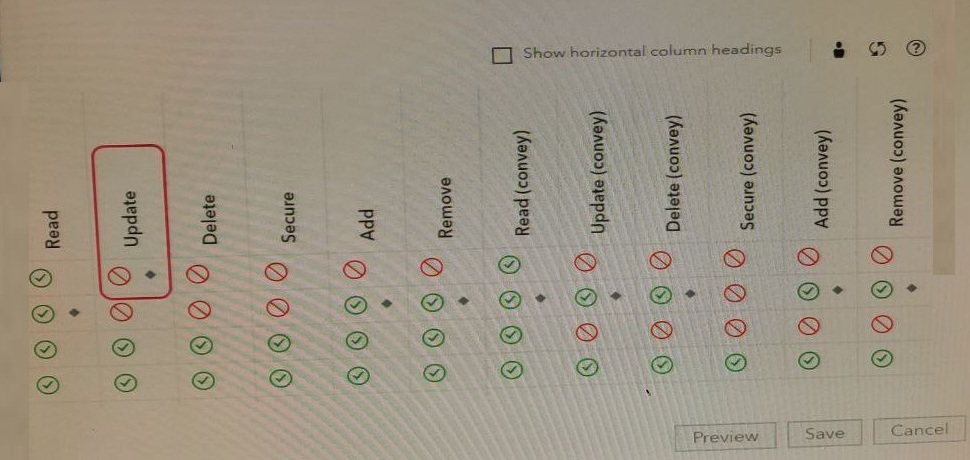
Refer to the exhibit.

Why is there a warning sign next to Jerry's name?
Refer to the exhibit (inverted color option of exhibit is available, if needed by clicking the tab):

What does this dashboard indicate about the availability of the environment?
When managing an existing SAS Viya deployment, which situations describe when you need to obtain a new software order? (Choose two.)
When you add on a new product or upgrade to a newer version of SAS Viya, you will need to obtain a new software order. This is because these changes involve additional or updated software components that are not covered under your existing license agreement.
Note: If you are only applying a hotfix or updating TLS certificates, you do not need to obtain a new software order. These changes do not involve additional or updated software components and can be done under your existing license agreement.
When using SAS Backup and Restore which is NOT backed up?
According to the official SAS Viya 3.5 documentation, data tables on the local file system are not backed up when using SAS Backup and Restore. You can find this information in the SAS Viya 3.5 Administering Guide page 22.
You have an MPP SAS Viva environment with a primary CAS Controller and a backup CAS Controller. The primary controller fails and your backup controller is now active.
Which task will you need to complete during the process of recovering the primary controller?
When recovering a primary controller, you need to restore the permstore from the backup controller to the primary controller. The permstore contains the state of the CAS session and other important information related to the CAS environment, such as configuration, metadata, and user data. Restoring the permstore from the backup controller allows the primary controller to resume operation with minimal data loss.
The process of restoring the permstore from the backup controller to the primary controller can be done by using the sas-admin permstore-restore command.
It is important to note that, before restoring the permstore, you should stop SAS services on all the CAS workers, in order to avoid data corruption during the restore process. Also, it is not recommended to delete the permstore from the backup controller, as it is useful in case of primary controller failure. CASDISKCACHE is used for caching purpose, it's not related to permstore or primary controller failure.
Full Exam Access, Actual Exam Questions, Validated Answers, Anytime Anywhere, No Download Limits, No Practice Limits
Get All 61 Questions & Answers