Prepare for the Workday Pro Time Tracking Exam exam with our extensive collection of questions and answers. These practice Q&A are updated according to the latest syllabus, providing you with the tools needed to review and test your knowledge.
QA4Exam focus on the latest syllabus and exam objectives, our practice Q&A are designed to help you identify key topics and solidify your understanding. By focusing on the core curriculum, These Questions & Answers helps you cover all the essential topics, ensuring you're well-prepared for every section of the exam. Each question comes with a detailed explanation, offering valuable insights and helping you to learn from your mistakes. Whether you're looking to assess your progress or dive deeper into complex topics, our updated Q&A will provide the support you need to confidently approach the Workday-Pro-Time-Tracking exam and achieve success.
The time tracking administrator asks you to confirm that workers are reporting their scheduled hours each day.
What type of time calculation will you use?
The correct answer is B. Minimum Daily.
In Workday Time Tracking, a Minimum Daily time calculation is used when the business needs to compare the amount of time a worker reported in a day against an expected minimum threshold. When the requirement is to confirm that workers are reporting their scheduled hours each day, this is essentially a daily minimum-hours validation and calculation scenario. Workday uses Minimum Daily logic to evaluate whether reported time meets the expected number of hours for that day and to identify shortfalls when the worker reports less than the required amount.
This calculation type is commonly used in situations where organizations need to ensure daily schedule compliance, guaranteed minimums, or identify underreported time based on work expectations. Since the question is about confirming scheduled daily hours, Minimum Daily is the best fit because it focuses directly on the comparison of daily reported hours against the expected daily amount.
The other options are not correct for this purpose. Shift Differential is used for premium treatment based on shift timing, such as evening or night work. Time Block Conditional evaluates conditions on individual time blocks, but it is not the standard calculation type for checking whether daily scheduled hours were fully reported. Standard Overtime applies to hours exceeding thresholds, not to verifying whether minimum scheduled hours were entered.
So the correct calculation type is Minimum Daily.
Refer to the following scenario to answer the question below.
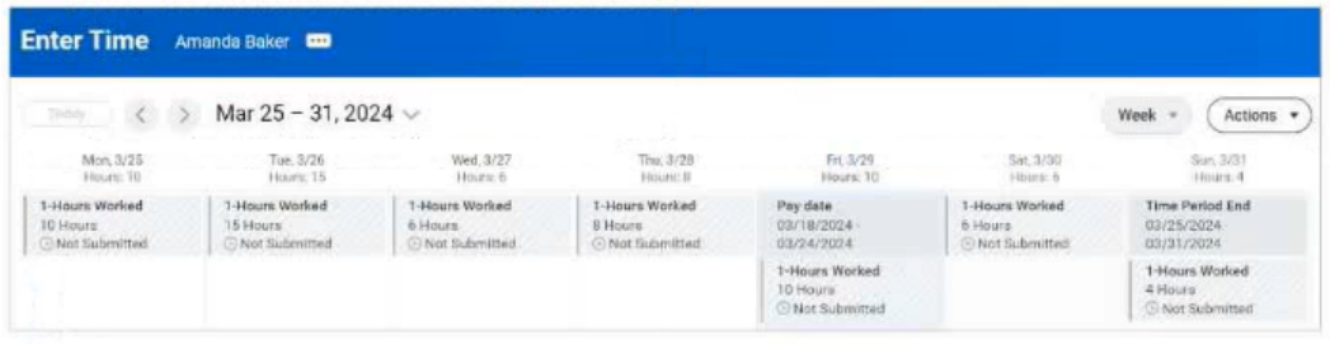
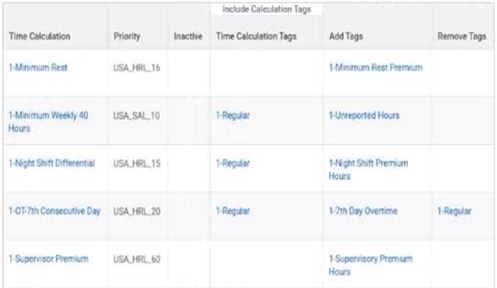
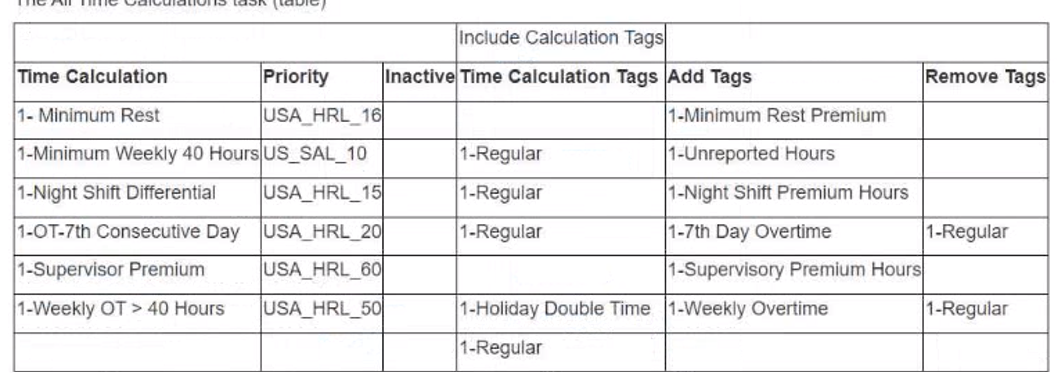
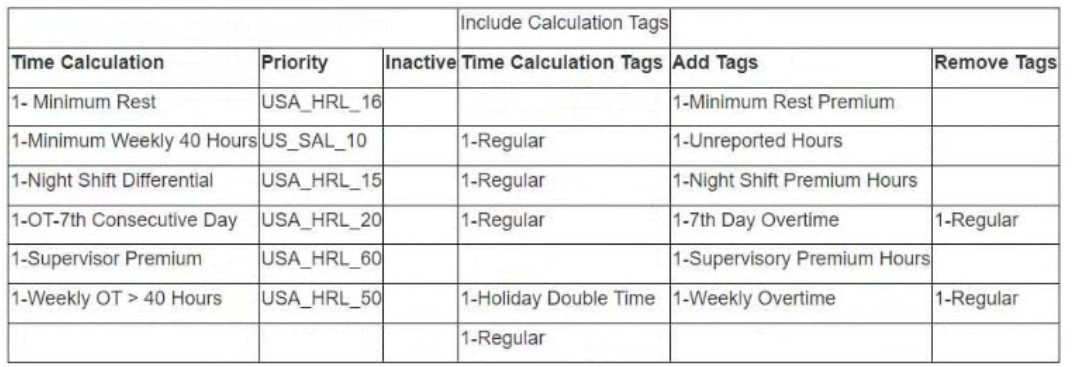
You are reviewing time for a worker. The worker has reported hours for the seventh consecutive day and the hours are calculating as configured. This week, the worker reported 11 hours on the seventh consecutive day worked. This worker is eligible for double-time on all hours worked over 8 hours on the seventh consecutive day; however, all 11 hours are tagged as seventh consecutive day hours.
To solve this issue, you determine that the worker should be made eligible for a specific time tracking component.
What time tracking component should this worker be eligible for?
The correct answer is C. Time Calculation Group.
In Workday Time Tracking, a Time Calculation Group is the component that bundles together the time calculations that apply to a specific worker population. If a worker should receive special overtime or double-time logic---such as double time for hours over 8 on the seventh consecutive day---the worker must be eligible for the appropriate Time Calculation Group that contains those rules.
In this scenario, the worker's time is being tagged as seventh consecutive day hours, but the expected split into double time after 8 hours is not occurring. That strongly suggests the worker is not currently eligible for the calculation group that includes the seventh consecutive day double-time calculation. Making the worker eligible for the correct calculation group ensures Workday runs the additional rule needed to reclassify hours over the threshold.
The other options are not correct for this purpose. A Time Entry Template controls how time is entered, not how overtime logic is calculated. A Time Calculation Tag is a result or identifier used by calculations, not an eligibility-based worker component. A Time Code Group organizes time entry codes, but it does not determine whether complex overtime calculations are applied.
Therefore, the worker should be made eligible for the appropriate Time Calculation Group
You have configured a Time Calculation Tag to tag all hours worked on the seventh consecutive day.
Where will these hours display in the Worker's Time Entry Calendar?
The correct answer is B. On the Calculated tab in the Time Block in the Worker's Time Entry Calendar on the day the hours were worked.
In Workday Time Tracking, a Time Calculation Tag is part of the calculation framework used to identify or classify time after Workday evaluates the entered hours through configured calculation logic. When a rule tags hours worked on the seventh consecutive day, that result is not treated as the original entered time itself. Instead, it is displayed as a calculated result tied to the time block for the relevant date.
That is why these tagged hours appear on the Calculated tab of the worker's time block. The entered line remains the source time entry, while the calculated section shows the results produced by Workday's time calculations, such as tagged hours, overtime, premiums, or other rule-based outcomes.
Option D is incorrect because the top line of the time block is generally where the worker's entered time appears, not the detailed calculation-tag output. Option A is incorrect because the Work Schedule Calendar reflects planned schedule information, not calculated time-tag results. Option C is incorrect because View Worker's Time Eligibility is used to review assigned time tracking components, not to display daily calculated tagged hours.
So the correct display location is the Calculated tab in the time block.
Which report should you run to ensure a worker only has one period schedule?
The correct answer is D. Audit - Workers with Multiple Time Period Schedules.
In Workday Time Tracking, a worker should generally have only one active time period schedule so that time entry, approvals, period close, and downstream payroll processing function correctly. When a worker is assigned to more than one time period schedule, it can create confusion around which period controls their time entry deadlines, submission windows, and approval timing. Because this is a setup and data integrity issue, Workday provides a specific audit report to identify workers who have this problem.
The report Audit - Workers with Multiple Time Period Schedules is designed exactly for this purpose. It helps administrators quickly find workers with conflicting schedule assignments so corrective action can be taken. This makes it the best report to run when validating time tracking configuration and ensuring clean administrative setup.
The other options are not intended for this audit purpose. View Work Schedule Calendar shows schedule-related calendar details, not duplicate period schedule assignments. View Period Schedule displays the schedule itself, but not necessarily workers with multiple assignments. View Worker's Time Eligibility is used to review time tracking eligibility rules and related setup, not to detect duplicate period schedules.
To prevent a worker from entering time on a holiday, which two business objects can you reference to create a critical validation to remind workers of this restriction?
The correct answer is D. Time Day and Time Block.
In Workday Time Tracking, a validation that prevents or warns against time entry on a holiday must evaluate both the date context and the entered time record. The Time Day business object is used to determine day-level attributes, such as whether the date is a holiday. The Time Block business object is used to evaluate the actual time entry being submitted or edited. Together, these two objects give Workday the information it needs to create a critical validation that checks whether a worker is trying to enter time on a holiday.
This pairing is appropriate because the holiday condition itself exists at the day level, while the transaction being controlled is the time block. A critical validation can then be configured to trigger when a time block is entered on a day identified as a holiday.
The other options are less appropriate. Worker may be useful for worker-specific eligibility or attributes, but it does not provide the direct day-and-entry combination needed for this specific validation. Time Shift is related more to scheduled shift context and is not the primary business object for validating holiday entry against submitted time blocks.
Therefore, to create a critical validation that reminds or restricts workers from entering time on a holiday, the correct business objects are Time Day and Time Block.
Full Exam Access, Actual Exam Questions, Validated Answers, Anytime Anywhere, No Download Limits, No Practice Limits
Get All 55 Questions & Answers