
Trusted Worldwide Questions & Answers
Most Recent Guidewire InsuranceSuite-Developer Exam Dumps
Prepare for the Guidewire Associate Certification - InsuranceSuite Developer - Proctored Exam exam with our extensive collection of questions and answers. These practice Q&A are updated according to the latest syllabus, providing you with the tools needed to review and test your knowledge.
QA4Exam focus on the latest syllabus and exam objectives, our practice Q&A are designed to help you identify key topics and solidify your understanding. By focusing on the core curriculum, These Questions & Answers helps you cover all the essential topics, ensuring you're well-prepared for every section of the exam. Each question comes with a detailed explanation, offering valuable insights and helping you to learn from your mistakes. Whether you're looking to assess your progress or dive deeper into complex topics, our updated Q&A will provide the support you need to confidently approach the Guidewire InsuranceSuite-Developer exam and achieve success.
The questions for InsuranceSuite-Developer were last updated on Oct 9, 2026.
- Viewing page 1 out of 31 pages.
- Viewing questions 1-5 out of 154 questions
A developer has modified the DesktopActivities list view in ClaimCenter to add a date cell to display the claim date of loss for each row. The list view is backed by the view entity ActivityDesktopView. The screenshot provided shows the current configuration of the new date cell with the value
ActivityDesktopView.Claim.LossDate.
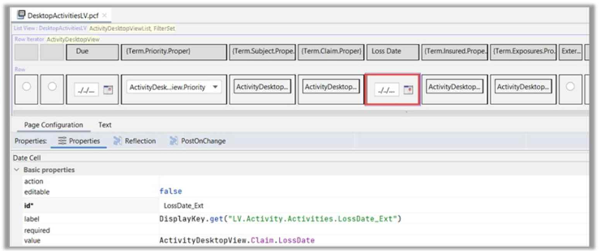
Which action should be taken to configure the date cell to follow best practices?
In Guidewire InsuranceSuite, View Entities are specialized data model objects designed specifically for high-performance data retrieval in ListViews (LVs). Unlike standard entities, View Entities act similarly to database views, allowing the application to fetch a flattened set of data from multiple related tables in a single, optimized SQL query.
According to PCF Configuration and Data Model best practices, when a developer adds a column to a ListView backed by a View Entity, the value for that cell should ideally be a direct property of the View Entity itself. In the provided screenshot, the developer is using "dot-traversal" logic: ActivityDesktopView.Claim.LossDate. This configuration requires the UI engine to traverse from the View Entity to the related Claim entity for every single row rendered in the list. While functional, this creates a significant performance overhead, as it can lead to "N+1" query problems or inefficient memory usage when the list contains a large number of activities.
The verified best practice is to Extend the view entity (via an .etx file) to include the desired field. By adding a viewEntityColumn or viewEntityTypekey to ActivityDesktopView with a path of Claim.LossDate, the Guidewire platform includes this data in the initial projection of the SQL query used to populate the list. Consequently, the ListView can access the date directly as ActivityDesktopView.LossDate_Ext. This architectural approach ensures that the user interface remains responsive and follows the SurePath performance standards required for both on-premise and Cloud-native Guidewire implementations.
==========
The following screenshot displays a segment of the menu items in the sidebar on a Guidewire application:
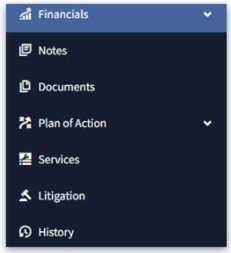
[Financials, Notes, Documents, Plan of Action, Services, Litigation, History]. The business analysts have uncovered a requirement that the Documents, History, Litigation, and Notes pages should be grouped under a single heading, to be called Legal Records. What is the best practice for accomplishing this?
In the Guidewire InsuranceSuite UI architecture, the organization of navigation elements is governed by the hierarchy of PCF Locations. A location represents a destination in the application, such as a Page, a Worksheet, or a Wizard. When requirements call for grouping multiple related pages into a logical, hierarchical structure within the sidebar or a tab set, the standard architectural component used is the Location Group.
A Location Group acts as a container for other locations (Pages, Forwards, or even nested Location Groups). According to PCF Architecture best practices, creating a Location Group named "Legal Records" and nesting the Documents, History, Litigation, and Notes pages within it allows the UI engine to render them as sub-items under a single, expandable heading. This maintains a clean and organized sidebar, which is critical for usability as the complexity of an application grows. Once the Location Group is defined and added to the Sidebar PCF, the individual page references are removed from the top-level sidebar configuration to prevent redundancy.
In contrast, Option A is incorrect because a "Screen" is a container for UI widgets (like DetailViews and ListViews) within a page, not a navigation location itself. Option C refers to user preferences, which do not change the underlying application configuration or satisfy structural business requirements. Option D describes a manual styling approach that does not leverage the built-in navigation framework; using indents and labels manually is not upgrade-safe and fails to provide the true modal navigation behavior (such as showing the group as "active" when any child page is selected) provided by a proper Location Group. Therefore, using a Location Group is the only verified best practice for grouping sidebar navigation items.
==========
A ListView shows related Policies for a policyholder. When a user clicks a Policy Number in a text cell, the UI should open a Popup showing details of that specific policy. The elementName property in the row iterator is currentPolicy. What is the correct syntax to open the popup?
In Guidewire PCF Configuration, navigating between different parts of the application requires a clear understanding of Location types and their corresponding Gosu methods. When a requirement specifically calls for a Popup, the developer must use the .push() method.
The .push() method is used for "modal" or "semi-modal" navigation. It places the new location (the Popup) on top of the current navigation stack, allowing the user to perform a task and then return exactly where they were when the popup is dismissed. In contrast, the .go() method (seen in Option A) is used for "terminal" navigation, which replaces the current location entirely; it is used for moving between main Pages or Location Groups. Using .go() for a popup would violate the intended UI flow and likely result in a runtime error or unexpected navigation behavior.
Furthermore, the logic to trigger this navigation must be placed in the Action property of the widget (typically a TextCell or Link). The actionAvailable property (Options B and C) is a Boolean expression used only to determine if the action is clickable (i.e., whether the link is active or grayed out based on permissions or data state); it cannot execute the navigation itself. By specifying PolicyPopup.push(currentPolicy) in the Action property, the developer ensures that the currentPolicy object (defined by the RowIterator's elementName) is passed as a parameter to the popup, allowing it to display the correct details. This follows the standard PCF Architecture for drill-down interactions.
Given the method below:
public function FriendlyGreeting (name: String): String {
if (name == null or name.length == 0) throw "Requires a non-empty string!"
return "Hello, " + name + "!"
}
What best practice is violated in the code?
Standardization and readability are critical components of Gosu Syntax and development within Guidewire. The language follows specific naming conventions that align with common object-oriented practices (similar to Java or C#). According to the InsuranceSuite Developer Fundamentals, method names and variable names must follow lowerCamelCase. This means they should begin with a lowercase letter, and each subsequent concatenated word should begin with an uppercase letter.
In the provided , the method is named FriendlyGreeting. Because it begins with an uppercase "F", it violates the naming convention for methods and could be easily mistaken for a Class or Type constructor, which should follow UpperCamelCase (also known as PascalCase). Correcting this to friendlyGreeting ensures that the code is consistent with the rest of the out-of-the-box (OOTB) Guidewire codebase and follows the Gosu Coding Standards.
Regarding the other options: A is incorrect because the return statement is validly returning a single concatenated String. B is incorrect because throwing exceptions is a standard way to handle unexpected data or state errors in Gosu logic. C is incorrect because a method is not required to have a catch block for a throw statement; the exception is intended to be propagated up the call stack to a handler or the system's top-level error management. Therefore, the naming convention violation in Option D is the primary best practice issue identified in the snippet.
==========
A developer needs to run multiple GUnit test classes so that they can be run at the same time. Which two statements are true about the included tests? (Select two)
In the Guidewire System Health & Quality modules, the focus is on scaling automated testing using GUnit. When a developer has a large number of tests, running them individually is inefficient. To group tests logically and execute them as a batch---often as part of a CI/CD pipeline in TeamCity---Guidewire utilizes Test Suites.
To group multiple test classes into a single suite (Option E), they must share the same @Suite annotation. This annotation tells the GUnit runner that these classes are part of a specific collection, such as a "Smoke Test Suite" or a "Financials Logic Suite." This allows for structured execution and reporting across the entire implementation.
Additionally, for tests to run together effectively and share a consistent environment, they typically must be based on the same GUnit base class (Option A). In Guidewire, base classes like GWTestBase or custom insurer-specific base classes provide the necessary "scaffolding"---such as database connection handling, bundle management, and authentication---required for the tests to run within the InsuranceSuite framework. Without a shared base class, individual tests might attempt to initialize the system in conflicting ways, leading to "flaky" tests or execution failures.
Options B and C are incorrect because the goal of a suite is to group different classes, and properties like TestResultsDir are usually handled by the build runner (TeamCity) rather than the individual test code. Option D is a specific assertion method and has no bearing on how tests are grouped or executed in parallel.
Unlock All Questions for Guidewire InsuranceSuite-Developer Exam
Full Exam Access, Actual Exam Questions, Validated Answers, Anytime Anywhere, No Download Limits, No Practice Limits
Get All 154 Questions & Answers